tencent cloud

Tencent Effect SDK

Release Notes and Announcements
Release Notes
Tencent Effect SDK V3.5 Version Released
Tencent Effects SDK V3.0 Version Related API and Material Changes
Product Introduction
Overview
Features
Basic Concepts
Strengths
Use Cases
Purchase Guide
Pricing Overview
Purchase Guide
Payment Overdue and Refund
Tutorial
Demos
Free Trial License
Licenses
Adding and Renewing a License (Mobile)
Adding and Renewing a License (Desktop)
Adding and Renewing a License (Web)
FAQs
SDK Download
Features
SDK Download
Version History
SDK Integration Guide(No UI)
General Integration of Tencent Effect
Integrating Capabilities
SDK Integration Guide(Including UI)
General Integration of Tencent Effect
Integrating Tencent Effect into MLVB SDK
Integrating Tencent Effect into TRTC SDK
Integrating Tencent Effect into UGSV SDK
Virtual Avatars
API Documentation
iOS
Android
Flutter
Web
Feature Guide
Reducing SDK Size
SDK Integration Issue Troubleshooting
Performance Fine-Tuning
Effect Fine-Tuning
Material Usage
Effect Parameters
Recommended Parameters in Beautification Scenarios
UGSV Enterprise Edition Migration Guide
Integrating Tencent Effect for Third-Party Publishers (Flutter)
Integrating Beauty AR Web into Mini Programs
Tencent Effect Studio Usage
Beauty AR Web
Overview
Quick Start
SDK Integration
Parameters and APIs
Console Guide
Demos
Preset Effect List
Practical Tutorial
FAQs
FAQs
General
Technical
License
Legacy Documentation
Recommended Parameters in Beautification Scenarios
Beauty Parameters Table
One-Minute Integration of TRTC
One-Minute Integration of Live Streaming
TE SDK Policy
Privacy Policy
Data Processing And Security Agreement
Contact Us
DocumentationTencent Effect SDKFeature GuideIntegrating Tencent Effect for Third-Party Publishers (Flutter)

Integrating Tencent Effect for Third-Party Publishers (Flutter)

PDF
Focus Mode
Font Size
Last updated: 2025-09-29 17:06:46
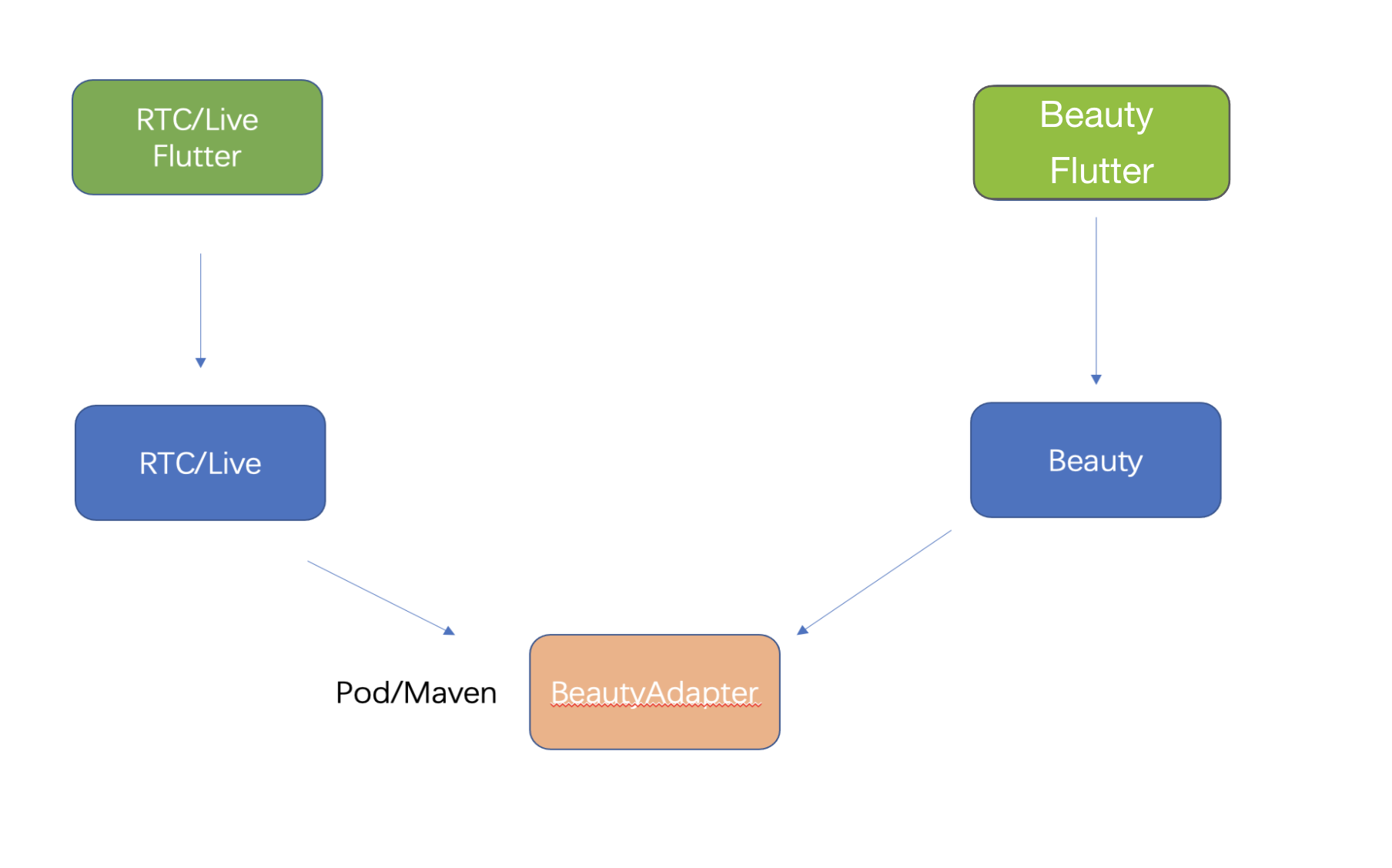
Because the Flutter OpenGL environment is isolated from a native environment, you cannot integrate the Tencent Effect SDK directly into Flutter. You need to establish connections between them at the native side.


How It Works

1. Create an API abstraction layer and implement the API at the Tencent Effect SDK side.
2. When the application is launched, register the API with the third-party publisher so that the third-party publisher can use it to create, use, and terminate an effect instance.
3. The third-party publisher exposes the capabilities of creating and terminating effect instances to the Flutter side.
4. Use the Tencent Effect Flutter SDK to configure effects.

Android

Example (TRTC)

API defined at the Tencent Effect side
public interface ITXCustomBeautyProcesserFactory {

/**
* Create an instance
* @return
*/
ITXCustomBeautyProcesser createCustomBeautyProcesser();

/**
* Terminate an instance (this API must be called in the OpenGL thread)
*/
void destroyCustomBeautyProcesser();
}
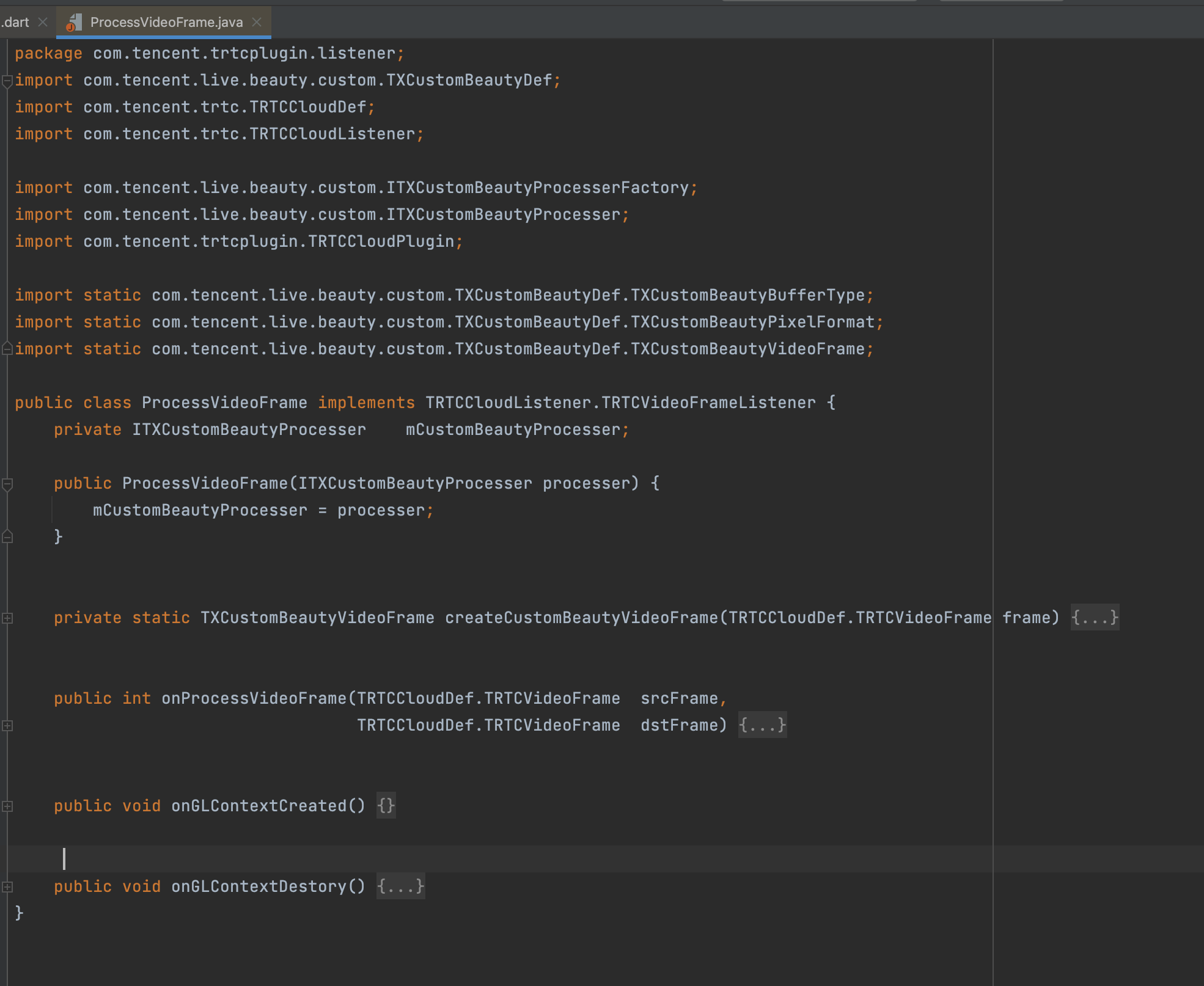
public interface ITXCustomBeautyProcesser {

// Get the pixel formats supported for video frames. Tencent Effect supports OpenGL 2D textures.
TXCustomBeautyPixelFormat getSupportedPixelFormat();
// Get the container formats supported for video frames. Tencent Effect supports V2TXLiveBufferTypeTexture, which delivers the best performance and has the smallest impact on video quality.
TXCustomBeautyBufferType getSupportedBufferType();
// Call this API in the OpenGL thread (`srcFrame` must include RGBA textures and the width and height). After processing, the texture object will be included in `texture.textureId` of `dstFrame`.
void onProcessVideoFrame(TXCustomBeautyVideoFrame srcFrame, TXCustomBeautyVideoFrame dstFrame);
}
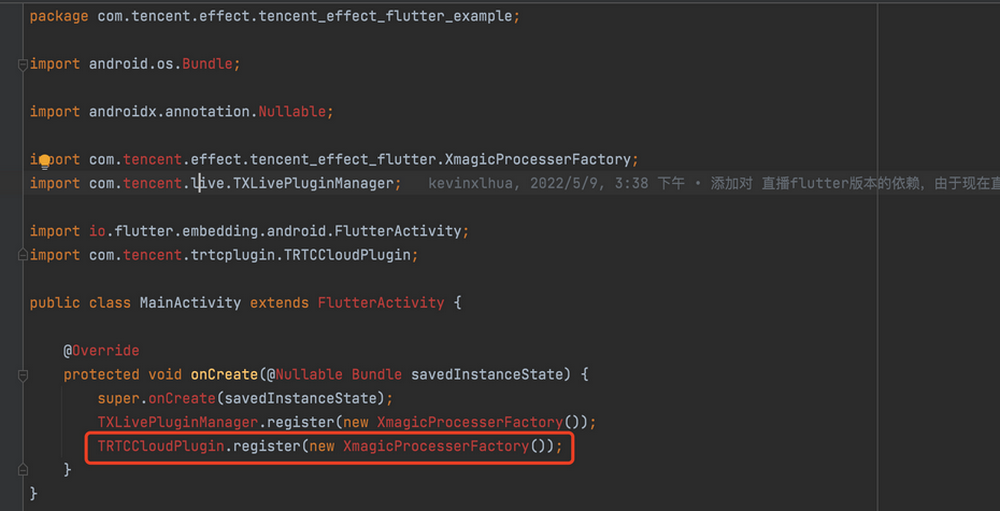
1. TRTC offers a registration method. When the application is launched, register com.tencent.effect.tencent_effect_flutter.XmagicProcesserFactory, the implementation class of ITXCustomBeautyProcesserFactory with TRTC (at the native side).


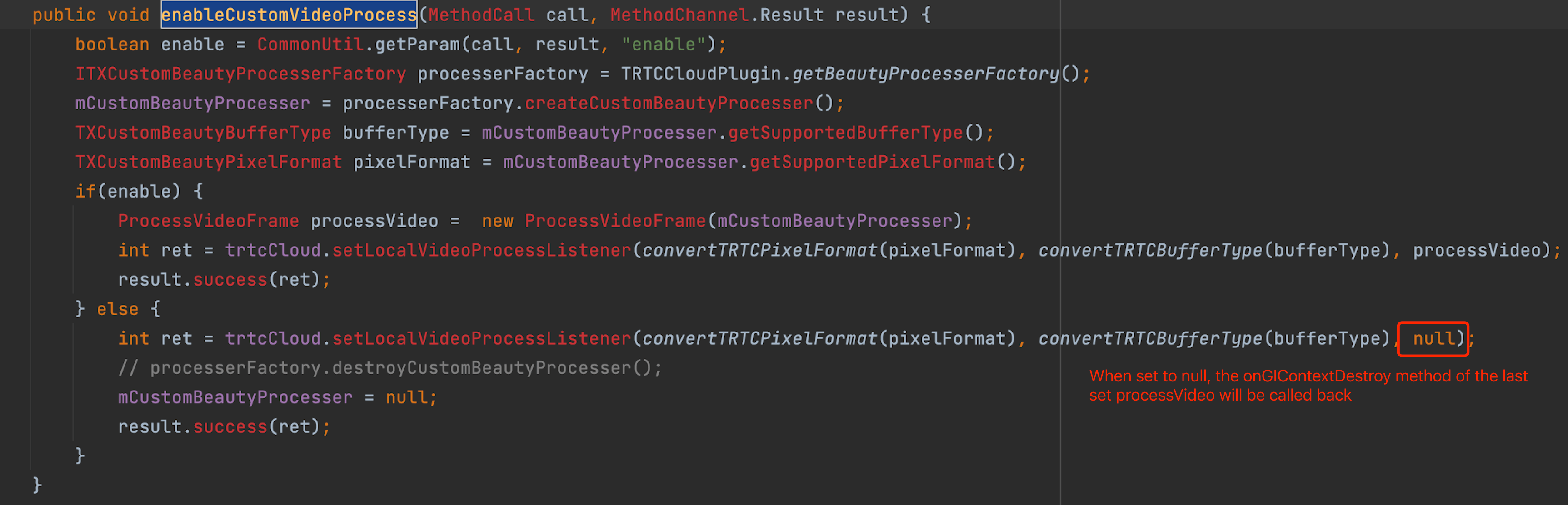
2. At the Flutter layer, provide Future<V2TXLiveCode> enableCustomVideoProcess(bool enable), which is used to enable or disable custom effects.
3. Enable or disable effects at the TRTC native side.


Appendix

The abstraction layer dependency provided by Tencent Effect
///
implementation 'com.tencent.liteav:custom-video-processor:latest.release'

iOS

Beauty effect side API:

@objc public protocol ITXCustomBeautyProcesserFactory {
/// Create a beauty effect instance
func createCustomBeautyProcesser() -> ITXCustomBeautyProcesser
/// Terminate a beauty effect instance
func destroyCustomBeautyProcesser()
}
@objc public protocol ITXCustomBeautyProcesser {
/// Get third-party beauty feature PixelFormat
func getSupportedPixelFormat() -> ITXCustomBeautyPixelFormat
/// Get third-party beauty feature BufferType
func getSupportedBufferType() -> ITXCustomBeautyBufferType
/// Callback for NativeSDK video custom processing
/// - Returns: Returns the video frame object processed by the third-party beauty feature SDK
func onProcessVideoFrame(srcFrame: ITXCustomBeautyVideoFrame, dstFrame: ITXCustomBeautyVideoFrame) -> ITXCustomBeautyVideoFrame
}

1. TRTC provides a method of registration. During application startup, the implementation class com.tencent.effect.tencent_effect_flutter.XmagicProcesserFactory of the beauty effect ITXCustomBeautyProcesserFactory API needs to be registered into TRTC (perform on the native end).


2. At the Flutter layer, the Future<V2TXLiveCode> enableCustomVideoProcess(bool enable) API is provided to enable or disable the custom beauty interface.
3. TRTC implements the beauty effect toggle method on the native end.
/// Enable/disable custom video processing.
@objc
func enableCustomVideoProcess(call: FlutterMethodCall, result: @escaping FlutterResult) {
let key = "enable"
guard let enable = MethodUtils.getMethodParams(call: call, key: key, resultType: NSNumber.self)?.boolValue else {
FlutterResultUtils.handleMethod(code: .paramNotFound, methodName: call.method, paramKey: key, result: result)
return
}
guard let customBeautyInstance = TXLivePluginManager.getBeautyInstance() else {
FlutterResultUtils.handleMethod(code: .valueIsNull, methodName: call.method, paramKey: key, result: result)
return
}
customBeautyQueue.async { [weak self] in
guard let `self` = self else {
FlutterResultUtils.handleMethod(code: .valueIsNull, methodName: call.method, paramKey: key, result: result)
return
}
if (enable && self.beautyInstance == nil) {
self.beautyInstance = customBeautyInstance.createCustomBeautyProcesser()
}
guard let beautyInstance = self.beautyInstance else {
FlutterResultUtils.handleMethod(code: .valueIsNull, methodName: call.method, paramKey: key, result: result)
return
}
let pixelFormat = beautyInstance.getSupportedPixelFormat()
let bufferType = beautyInstance.getSupportedBufferType()
let v2PixelFormat = ConvertBeautyFrame.convertToV2LivePixelFormat(beautyPixelFormat: pixelFormat)
let v2BufferType = ConvertBeautyFrame.convertToV2LiveBufferType(beautyBufferType: bufferType)
let code = self.pusher.enableCustomVideoProcess(enable,
pixelFormat:v2PixelFormat,
bufferType:v2BufferType)
DispatchQueue.main.async {
result(NSNumber(value: code.rawValue))
}
}
}
public static func convertToV2LivePixelFormat(beautyPixelFormat: ITXCustomBeautyPixelFormat) -> V2TXLivePixelFormat {
switch beautyPixelFormat {
case .Unknown:
return .unknown
case .I420:
return .I420
case .Texture2D:
return .texture2D
case .BGRA:
return .BGRA32
case .NV12:
return .NV12
}
}
public static func convertToV2LiveBufferType(beautyBufferType: ITXCustomBeautyBufferType) -> V2TXLiveBufferType {
switch beautyBufferType {
case .Unknown:
return .unknown
case .PixelBuffer:
return .pixelBuffer
case .Data:
return .nsData
case .Texture:
return .texture
}
}

Appendix

The beauty effect's abstraction layer depends.
///
s.dependency 'TXCustomBeautyProcesserPlugin','1.0.2'

Help and Support

Was this page helpful?

Help us improve! Rate your documentation experience in 5 mins.

Feedback