tencent cloud

Tencent Effect SDK

Release Notes and Announcements
Release Notes
Tencent Effect SDK V3.5 Version Released
Tencent Effects SDK V3.0 Version Related API and Material Changes
Product Introduction
Overview
Features
Basic Concepts
Strengths
Use Cases
Purchase Guide
Pricing Overview
Purchase Guide
Payment Overdue and Refund
Tutorial
Demos
Free Trial License
Licenses
Adding and Renewing a License (Mobile)
Adding and Renewing a License (Desktop)
Adding and Renewing a License (Web)
FAQs
SDK Download
Features
SDK Download
Version History
SDK Integration Guide(No UI)
General Integration of Tencent Effect
Integrating Capabilities
SDK Integration Guide(Including UI)
General Integration of Tencent Effect
Integrating Tencent Effect into MLVB SDK
Integrating Tencent Effect into TRTC SDK
Integrating Tencent Effect into UGSV SDK
Virtual Avatars
API Documentation
iOS
Android
Flutter
Web
Feature Guide
Reducing SDK Size
SDK Integration Issue Troubleshooting
Performance Fine-Tuning
Effect Fine-Tuning
Material Usage
Effect Parameters
Recommended Parameters in Beautification Scenarios
UGSV Enterprise Edition Migration Guide
Integrating Tencent Effect for Third-Party Publishers (Flutter)
Integrating Beauty AR Web into Mini Programs
Tencent Effect Studio Usage
Beauty AR Web
Overview
Quick Start
SDK Integration
Parameters and APIs
Console Guide
Demos
Preset Effect List
Practical Tutorial
FAQs
FAQs
General
Technical
License
Legacy Documentation
Recommended Parameters in Beautification Scenarios
Beauty Parameters Table
One-Minute Integration of TRTC
One-Minute Integration of Live Streaming
TE SDK Policy
Privacy Policy
Data Processing And Security Agreement
Contact Us

iOS

PDF
Focus Mode
Font Size
Last updated: 2026-02-02 14:47:02
This documentation explains integrating and using the TEBeautyKit library in the Mobile Live Video BroadcastingStreaming (MLVB) SDK project.

Integration Steps

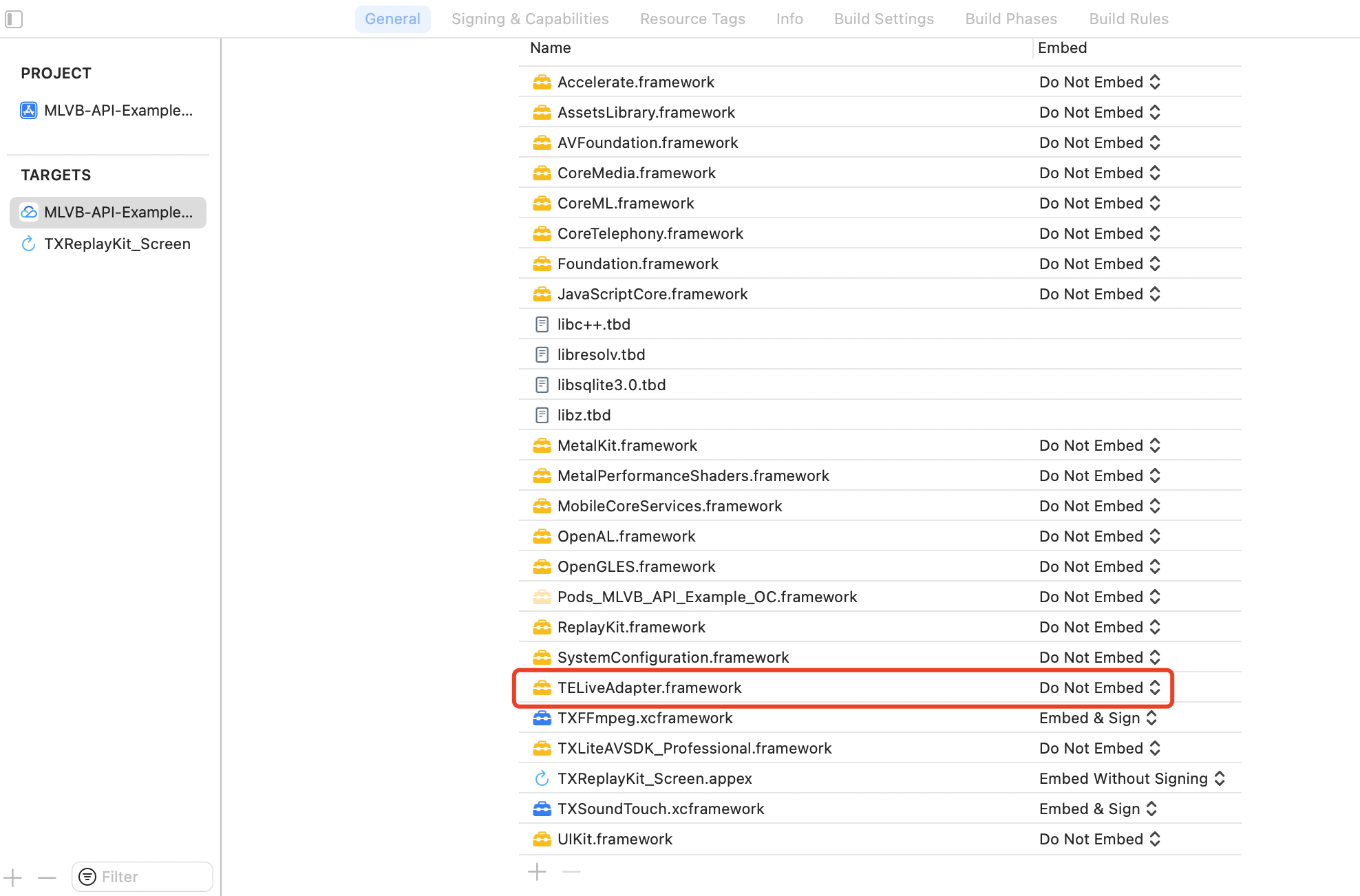
1. (Optional) Integrate TELiveAdapter. The TELiveAdapter.framework is used to receive video callbacks from the MLVB SDK, process them internally using the beauty filter SDK, and then return them to the MLVB SDK. If you need to perform custom processing on the video stream, you can skip this step.

2. Integration TEBeautyKit,Edit the Podfile and append the following code snippet and execution pod install.
# Replace S1-07 with the package you purchased
pod 'TEBeautyKit/S1-07', :podspec => 'https://mediacloud-76607.gzc.vod.tencent-cloud.com/TencentEffect/iOS/TEBeautyKit/latest/TEBeautyKit.podspec'
3. Integration Panel Resources,download the resource package and incorporate it into your main project. The contents can be found in the appendix.
4. Integration Effect Resources.

Usage Guide

Step 1. Authenticate

After the application is launched, a beauty filter authentication must be performed to enable the normal use of beauty features. See the authentication error code
[TEBeautyKit setTELicense:@"your license" key:@"your key" completion:^(NSInteger authresult, NSString * _Nullable errorMsg) {
NSLog(@"----------result: %zd %@",authresult,errorMsg);
}];

Step 2. Configuration Panel Resource Path

The beauty data and icon assets on the beauty panel are available in beauty_panel.zip. As per the API documentation, you may pass the corresponding JSON file path and customize the settings according to your specific requirements.
- (void)configPanel {
NSBundle *bundle = [NSBundle mainBundle];
NSString *beautyJsonPath = [bundle pathForResource:@"beauty" ofType:@"json"]; //Beauty
NSString *lutJsonPath = [bundle pathForResource:@"lut" ofType:@"json"]; //filter
NSString *motion2dJsonPath = [bundle pathForResource:@"motion_2d" ofType:@"json"]; //2D stickers
NSMutableArray *resArray = [[NSMutableArray alloc] init];
[resArray addObject:@{TEUI_BEAUTY : beautyJsonPath}];
[resArray addObject:@{TEUI_LUT : lutJsonPath}];
[resArray addObject:@{TEUI_MOTION_2D : motion2dJsonPath}];
/// Set up resources
[[TEUIConfig shareInstance] setTEPanelViewResources:resArray];
}

Step 3. Initialize and incorporate TEPanelView

TEPanelView is a custom panel view used to display the data configured in Step 2.
- (void)addPanelView {
TEPanelView *tePanelView = [[TEPanelView alloc] init];
tePanelView.delegate = self;
[self.view addSubview:tePanelView];
[tePanelView mas_makeConstraints:^(MASConstraintMaker *make) {
make.width.bottom.mas_equalTo(self.view);
make.left.right.mas_equalTo(self.view);
make.height.mas_equalTo(230 + self.view.safeAreaInsets.bottom);
}];
}
If TELiveAdapter is not integrated, please refer directly to Step 7.

Step 4: Adapter Binding for Beautification

/// create adapter
- (TEBeautyLiveAdapter *)liveAdapter {
if (!_liveAdapter) {
_liveAdapter = [[TEBeautyLiveAdapter alloc] init];
}
return _liveAdapter;
}
/// bind
__weak __typeof(self)weakSelf = self;
[self.liveAdapter bind:self.livePusher onCreatedXmagicApi:^(XMagic * _Nullable xmagicApi) {
__strong typeof(self) strongSelf = weakSelf;
strongSelf.teBeautyKit.xmagicApi = xmagicApi;
[strongSelf.teBeautyKit setLogLevel:YT_SDK_ERROR_LEVEL];
strongSelf.tePanelView.teBeautyKit = strongSelf.teBeautyKit;
[strongSelf.tePanelView setDefaultBeauty];
} onDestroyXmagicApi:^{
__strong typeof(self) strongSelf = weakSelf;
[strongSelf.teBeautyKit onDestroy];
strongSelf.teBeautyKit = nil;
}];

Step 5: Parameter Change Notification Adapter

/// Notify the Adapter of the Front and Rear Cameras: Whether to Encode a Mirror Image
[self.liveAdapter notifyCameraChanged:self.isFrontCamera isEncoderMirror:self.isEncoderMirror];
/// Notify the Adapter of Screen Orientation Changes
[self.liveAdapter setDeviceOrientation:orientation];

Step 6: Unbinding the Adapter

[self.liveAdapter unbind];
self.liveAdapter = nil;

Step 7: TELiveAdapter is not integrated.

Listen for MLVB video callbacks, process the beauty effects within the callback, and then return the processed video to MLVB.
1. Initialization
- (void)initXMagic {
__weak __typeof(self)weakSelf = self;
[TEBeautyKit createXMagic:EFFECT_MODE_PRO onInitListener:^(TEBeautyKit * _Nullable beautyKit) {
__strong typeof(self)strongSelf = weakSelf;
strongSelf.teBeautyKit = beautyKit;
strongSelf.tePanelView.teBeautyKit = strongSelf.teBeautyKit;
[strongSelf.tePanelView setDefaultBeauty];
[strongSelf.teBeautyKit setLogLevel:YT_SDK_ERROR_LEVEL];
[strongSelf.teBeautyKit registerSDKEventListener:strongSelf];
}];
}
2. Processing video data
- (void)onProcessVideoFrame:(V2TXLiveVideoFrame *)srcFrame dstFrame:(V2TXLiveVideoFrame *)dstFrame {
YTProcessOutput *output = [self.teBeautyKit processTexture:srcFrame.textureId
textureWidth:srcFrame.width
textureHeight:srcFrame.height
withOrigin:YtLightImageOriginTopLeft
withOrientation:YtLightCameraRotation0];
dstFrame.textureId = output.textureData.texture;
}
3. Destroy Beauty Filter
- (void)destroyXMagic {
[self.teBeautyKit onDestroy];
self.teBeautyKit = nil;
}

Help and Support

Was this page helpful?

Help us improve! Rate your documentation experience in 5 mins.

Feedback