tencent cloud

Tencent Cloud TI Platform

Product Introduction
Overview
Product Pricing
Benefits to Customers
Use Cases
Purchase Guide
Billing Overview
Purchase Mode
Renewal Instructions
Overdue Payment Instructions
Security Compliance
Data Security Protection Mechanism
Monitoring, Auditing, and Logging
Security Compliance Qualifications
Quick Start
Platform Usage Preparation
Operation Guide
Model Hub
Task-Based Modeling
Dev Machine
Model Management
Model Evaluation
Online Services
Resource Group Management
Managing Data Sources
Tikit
GPU Virtualization
Practical Tutorial
Deploying and Reasoning of LLM
LLM Training and Evaluation
Built-In Training Image List
Custom Training Image Specification
Angel Training Acceleration Feature Introduction
Implementing Resource Isolation Between Sub-users Based on Tags
API Documentation
History
Introduction
API Category
Making API Requests
Online Service APIs
Data Types
Error Codes
Related Agreement
Service Level Agreement
Privacy Policy
Data Processing And Security Agreement
Open-Source Software Information
Contact Us

Renewal Instructions

PDF
Focus Mode
Font Size
Last updated: 2026-03-12 20:37:18

Renewal Instructions

The nodes in the resource group whose billing mode is yearly/monthly will be released after the software fee expires. To ensure a stable and normal operation of the service, you need to pay attention to the expiration time of the resources of the nodes in the resource group with “yearly/monthly” billing mode, and pay attention to renewing the resources of the nodes before the expiration time, or set the nodes to renew automatically when the expiration time comes.
You can renew the software fee of nodes within the resource group in the TI-ONE console or Renewal management.

Renewing via the Console

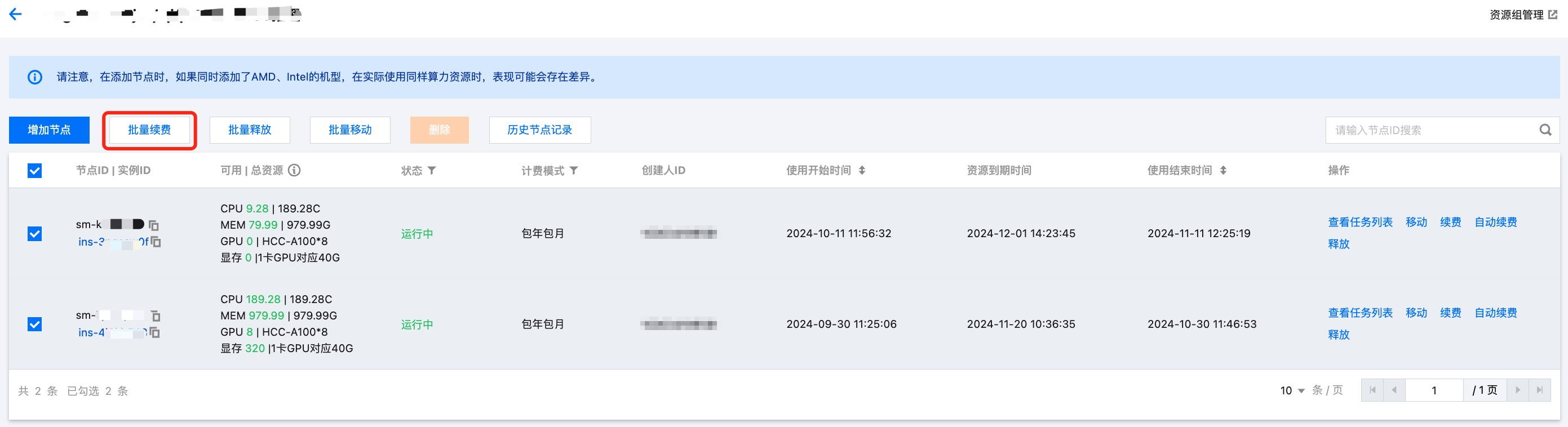
Batch Renewal of Resource Groups

Batch renewal allows you to renew the software fees of selected yearly/monthly subscription nodes in the resource group for the same duration. After confirming the renewal, the system will deduct fees based on the configuration of resource group nodes, renewal duration, and corresponding discount information.
Specific Operations:
Click the resource group name, enter a resource group, and select batch renewal.


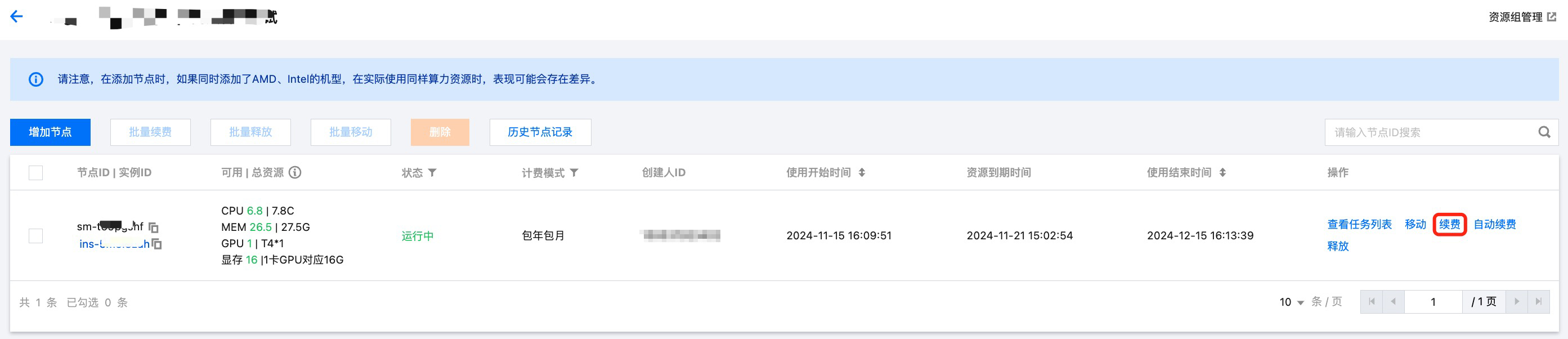
Renew a Single Node

Batch renewal is to issue the same software fee renewal instruction for selected yearly/monthly subscription nodes, while single-node software fee renewal can perform different renewal operations on specific yearly/monthly subscription nodes, offering more flexibility.
Specific Operations:
Click the resource group name to enter a resource group. Perform the renewal operation in the node list. Configure the renewal period in the pop-up window. Confirm and complete the deduction.


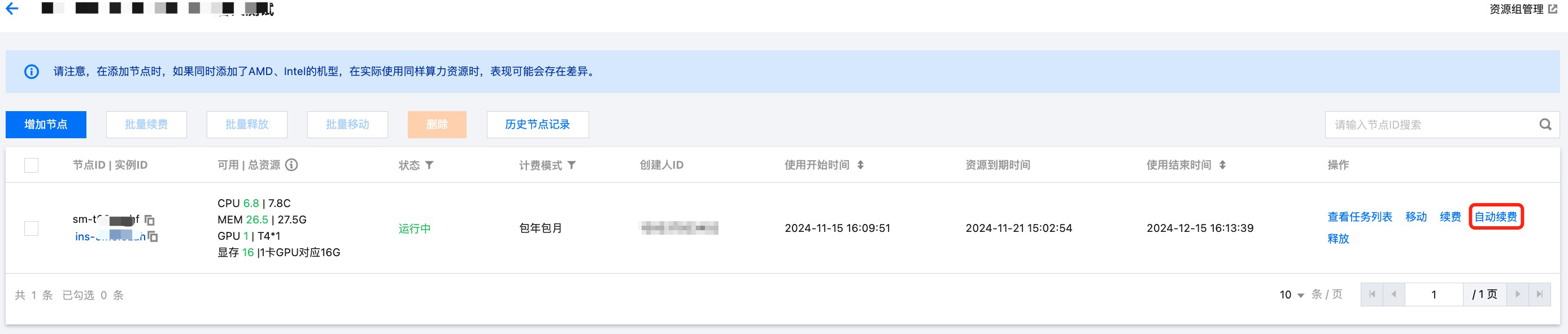
Enabling Automatic Renewal

If you plan to use yearly/monthly subscribed node resources of a resource group long term, you can enable automatic renewal of software fees for yearly/monthly subscribed nodes.
Specific Operations:
1. Automatic renewal can be enabled or cancelled in the node list

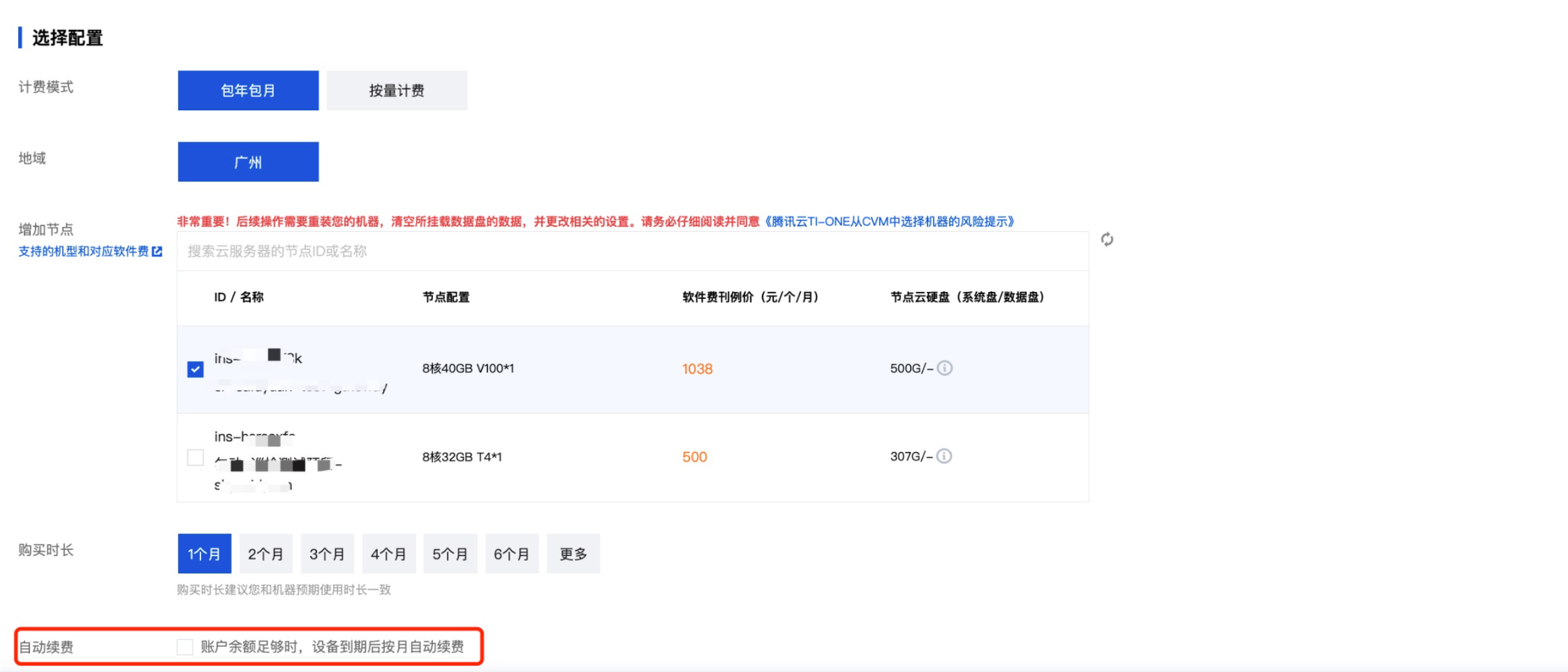
2. Automatic renewal can be enabled when adding nodes

Instructions on enabling automatic renewal
For resources that have been set for automatic renewal, we will renew them for you on the expiration date. Please try not to adjust the automatic renewal when the resources are approaching their expiration date.
On the expiration date, if the available balance in your account is insufficient for the automatic renewal of resources, the renewal will fail. To prevent this, you need to ensure there is sufficient renewal fund in your account.
If there are available vouchers in your account during renewal, the system will automatically use them for renewal.

Renewal in the Billing Center

Node Renewal

You can also log in to the Billing Center and select the corresponding node in Renewal management to perform the software fee renewal operation.

Enabling Automatic Renewal

In the Renewal Management module of the Billing Center, you can set the software fees of nodes with manual renewal to auto-renewal.

Help and Support

Was this page helpful?

Help us improve! Rate your documentation experience in 5 mins.

Feedback