1. Copy the HttpDns.cs file in HTTPDNSUnityDemo/Assets/Plugins/Scripts to the corresponding Assets/Plugins/Scripts path of Unity.
2. For the part that requires DNS query, call the HttpDns.GetAddrByName(string domain) or HttpDns.GetAddrByNameAsync(string domain) method.
If you use the sync API HttpDns.GetAddrByName, directly call it.
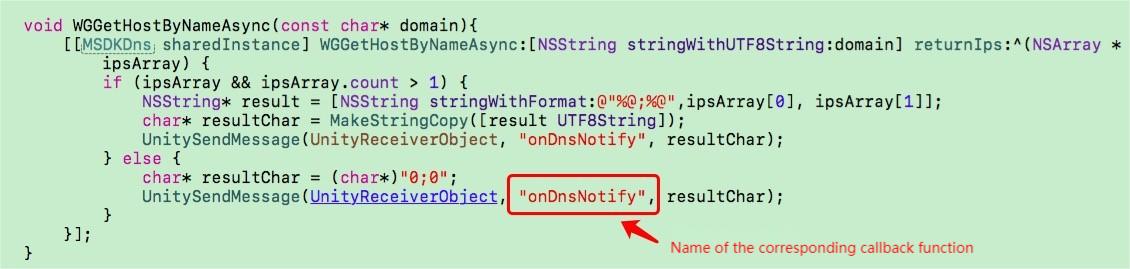
If you use the async API HttpDns.GetAddrByNameAsync, you need to set the callback function onDnsNotify(string ipString), which you can rename.
We also recommend you add the following processing code:
string[]sArray=ipString.Split(new char[]{';'});
if(sArray != null && sArray.Length >1){
if(!sArray[1].Equals("0")){
// Suggestion: Use an IPv6 address first if it exists
// TODO: When making a URL connection by using an IPv6 address, be sure to enclose the IPv6 address in square brackets, such as `http://[64:ff9b::b6fe:7475]/`
}else if(!sArray [0].Equals ("0")){
// Connect by using the IPv4 address
}else{
// `0,0` will be returned if an exception occurs. In this case, we recommend you retry once
HttpDns.GetAddrByName(domainStr);
}
}
3. Package the Unity project into an Xcode project, then follow this operation document to add required dependencies.
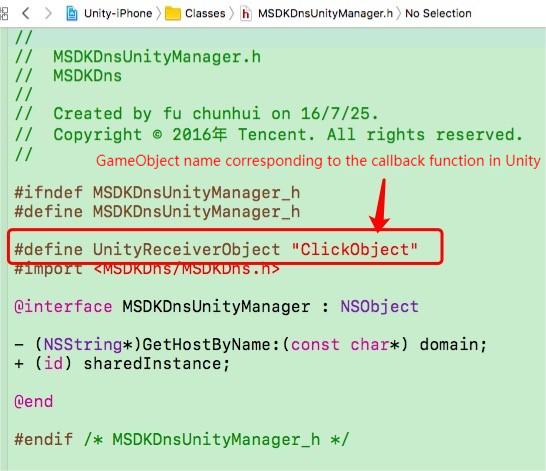
4. Import the MSDKDnsUnityManager.h and MSDKDnsUnityManager.mmfiles in HTTPDNSUnityDemo into the project. Note that the following parts need to be the same as the corresponding GameObject name and callback function name in Unity, as shown below: