tencent cloud

Tencent Cloud TCHouse-C

Release Notes
Product Introduction
Overview
Basic Concepts
Cluster Architecture
Strengths
Use Cases
Purchase Guide
Billing Overview
Expiration and Payment Overdue
Refund
Configuration Adjustment Billing
Getting Started
Operation Guide
Cluster Management
Parameter Configuration
Monitoring and Alarming
Hot/Cold Data Tiering
Account and Authorization
Query Management
Log Search
Data Dictionary
Backup and Restore
Multi-ZooKeeper Cluster
External Data Import
Configuring DDL on Cluster Feature
Data Redistribution
Scale-in and Migration
Development Guide
Database Engine
Table Engines
ClickHouse SQL Syntax Reference
ClickHouse Client Overview
Self-Built ClickHouse Migration Solution
Service Level Agreement
CDWCH Policy
Privacy Policy
Data Privacy and Security Agreement
FAQs
Contact Us
Glossary

Account and Authorization

PDF
Mode fokus
Ukuran font
Terakhir diperbarui: 2025-03-31 14:55:26

Overview

Tencent Cloud TCHouse-C provides a visual UI for you to create RBAC accounts and configure their permissions, quotas, settings profiles, and row policies. This helps you control account permissions in a CDW cluster more easily and efficiently.

Account

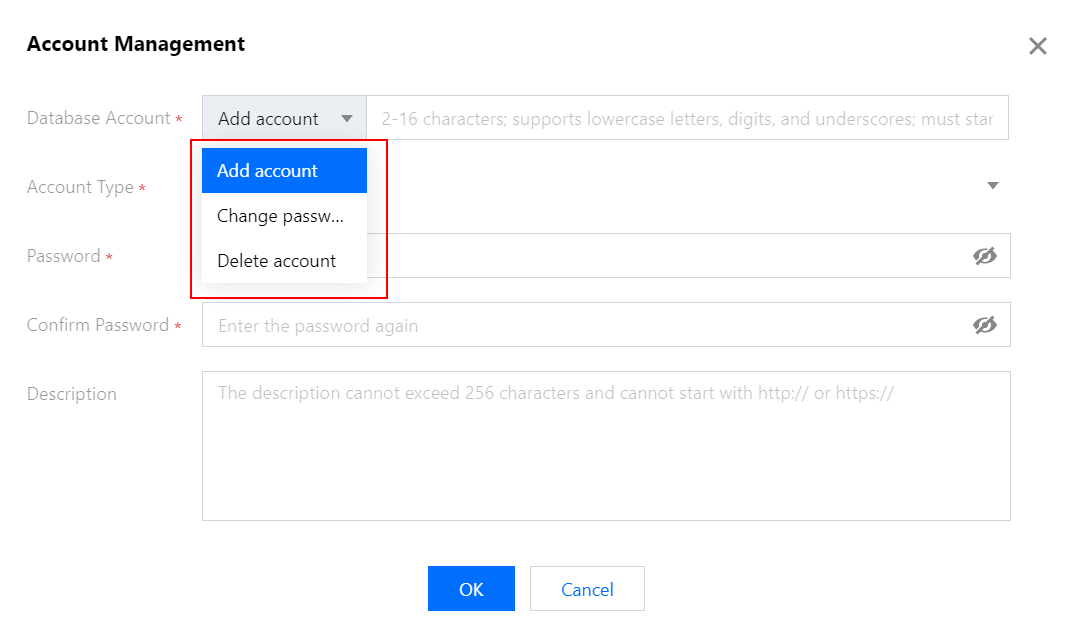
CDW allows you to create and delete accounts and view and reset passwords.
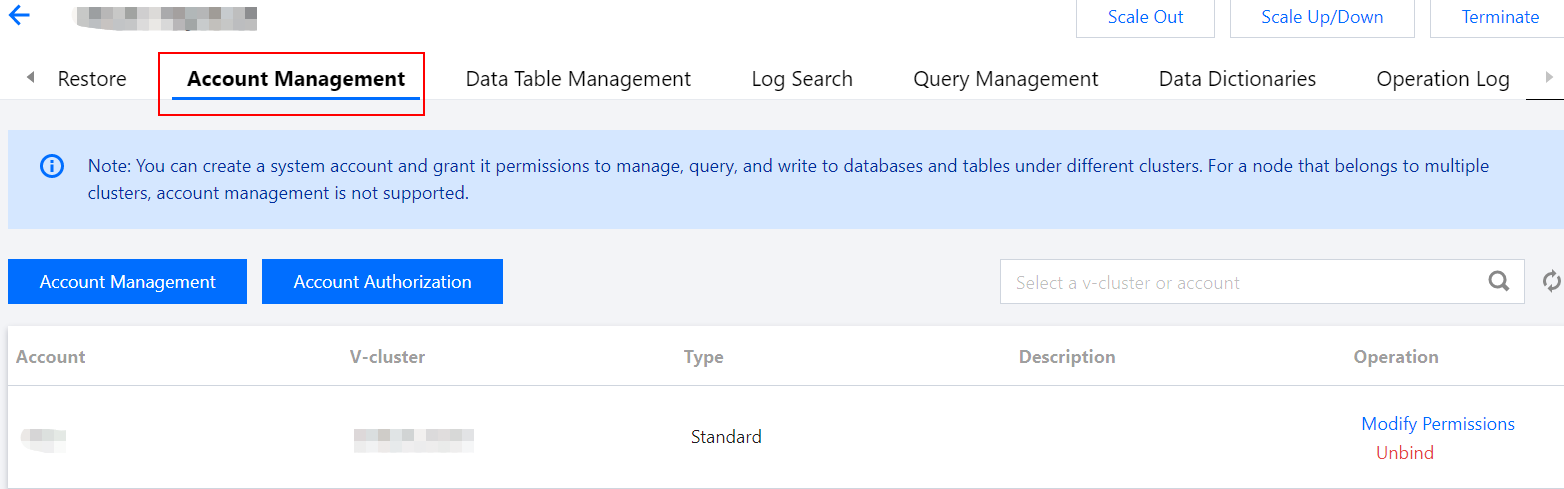
1. Log in to the Tencent Cloud TCHouse-C console, click a Cluster ID/Name in the cluster list to enter the cluster details page, and switch to Account Management.


2. You can add and delete accounts and change their passwords.


Note:
Account name rule: It can contain 2–16 lowercase letters, digits, and underscores and must start with a letter and end with a letter or digit.
Password rule: It must contain 8–30 (preferably more than 12) characters in at least three of the following types: lowercase letters, uppercase letters, digits, and symbols ()!@#$%^&*|?><, and cannot start with /.
An XML account is a user defined in the user.xml configuration file, while an RBAC account is an account created on the Account Management page. The two types of accounts are separated. We recommend you not use duplicate account names; otherwise, account permissions may be inconsistent.
XML accounts can be only queried but cannot be modified. You can only perform modifications in the user.xml configuration file.

Authorization

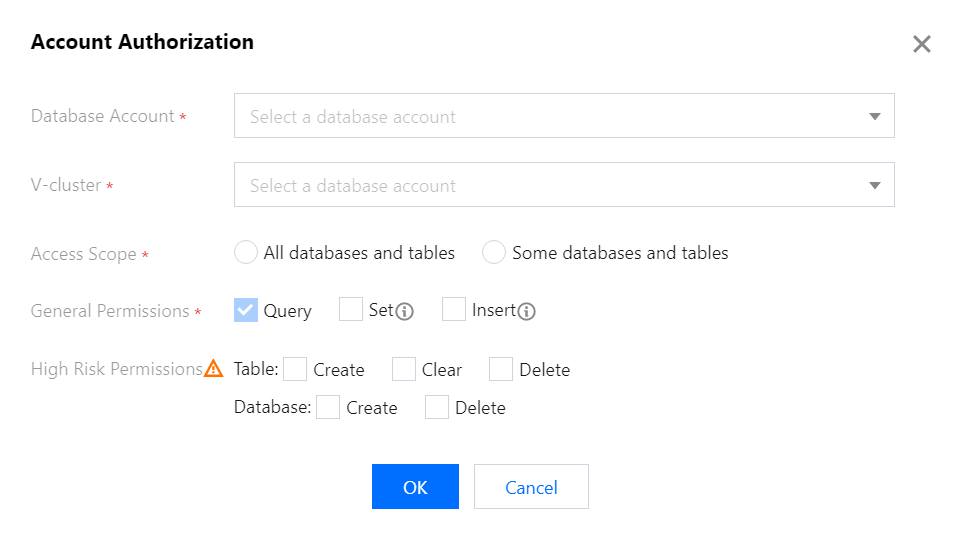
1. Log in to the Tencent Cloud TCHouse-C console, click the target ID/Name in the cluster list to enter the cluster details page, and switch to Account Management. Click Authorize Now to enter the Account Authorization tab and authorize the account (by selecting a V-cluster and granting permissions of databases and tables):


Access Scope: You can grant the permissions of all or certain databases and tables.
General Permissions:
Query (enabled by default): SELECT, which is used to query databases, tables, and views.
Configuration: ALTER, which is used to modify table structures.
Insertion: INSERT, which is used to insert table data.
High-Risk Permissions:
Table permissions
Table creation: CREATE TABLE, CREATE VIEW, and CREATE DICTIONARY, which are used to create tables, views, and dictionaries respectively.
Clearing: TRUNCATE and OPTIMIZE, which are used to clear and merge the table data respectively.
Table deletion: DROP TABLE, DROP VIEW, and DROP DICTIONARY, which are used to delete tables, views, and dictionaries respectively.
Database permissions
Database creation: CREATE DATABASE, which is used to create databases. This option takes effect globally. If it is selected, you can see all databases.
Database deletion: DROP DATABASE, which takes effect only for specific databases.
2. Authorize certain databases and tables.
Note:
Some databases and tables supports finer-granularity and more flexible database/table permission configuration; that is, you can configure different permissions for any databases/tables.
Each permission configuration is an incremental operation. Compared with previous permissions, unchanged permissions are not deleted, only removed permissions are deleted, and new permissions are added. This avoids affecting business operations during the permission change.

Configuration

On ClickHouse 20.3 and later, items that previously can only be configured through XML such as row policy, settings profile, and quota can be created, modified, and deleted through SQL statements.
1. Quota
Note:
A quota offers seven configuration items. You can hover over each of them to view the description.
In the console, you can select multiple configuration items among the seven items as a combination.
2. Settings profile Each settings profile contains a certain number of configuration items, and all 335 configuration items can be found in the settings table in the system database. In the console, you can select multiple configuration items as a combination and name them as a single settings profile, which can be applied to one or multiple RBAC accounts.
3. Row policy A row policy is a filter defining the rows that can seen by users.
Note:
If multiple row policies are configured for a table in the cluster, users with no policies configured cannot query the data of the table.

Notes

1. Operations on the Account Management page involve only RBAC accounts, but not XML accounts.
2. You can grant one account the permissions of multiple databases/tables in the V-cluster. Each operation generates an authorization record.
3. After authorization, you need to modify the password of the default passwordless XML account to avoid potential security risks.
4. After you configure an RBAC account on the Account Management page, you can run common ClickHouse commands on the Tencent Cloud TCHouse-C Studio platform in the CDW console.
5. The new Tencent Cloud TCHouse-C Studio platform is available now, and XML users can log in to it to perform operations.

Bantuan dan Dukungan

Apakah halaman ini membantu?

masukan