tencent cloud

TencentCloud Managed Service for Prometheus

Product Introduction
Overview
Strengths
Use Cases
Concepts
Use Limits
Features
Service Regions
Purchase Guide
Billing Overview
Pay-as-You-Go (Postpaid)
Free Trial Introduction
Managed Collector Billing Introduction
Archive Storage Billing Introduction
Purchase Methods
Payment Overdue
Getting Started
Integration Guide
Scrape Configuration Description
Custom Monitoring
EMR Integration
Java Application Integration
Go Application Integration
Exporter Integration
Nacos Integration
Common Exporter
Health Check
Instructions for Installing Components in the TKE Cluster
Cloud Monitoring
Non-Tencent Cloud Host Monitoring
Read Cloud-Hosted Prometheus Instance Data via Remote Read
Agent Self-Service Access
Pushgateway Integration
Security Group Open Description
Operation Guide
Instance
TKE
Integration Center
Data Multi-Write
Recording Rule
Instance Diagnosis
Archive Storage
Alerting Rule
Tag
Access Control
Grafana
API Guide
TKE Metrics
Resource Usage and Billing Overview
Practical Tutorial
Migration from Self-Built Prometheus
Custom Integration with CVM
TKE Monitoring
Enabling Public Network Access for TKE Serverless Cluster
Connecting TMP to Local Grafana
Enabling Public Network Access for Prometheus Instances
Configuring a Public Network Address for a Prometheus Instance
Terraform
Terraform Overview
Managing Prometheus Instances Using Terraform
Managing the Integration Center of Prometheus Instances Using Terraform
Collecting Container Monitoring Data Using Terraform
Configuring Alarm Policies Using Terraform
FAQs
Basic Questions
Integration with TKE Cluster
Product Consulting
Use and Technology
Cloud Monitor FAQs
Service Level Agreement
TMP Policy
Privacy Policy
Data Processing And Security Agreement
ドキュメントTencentCloud Managed Service for PrometheusOperation GuideTKE MetricsAdjusting Collection IntervalAdjusting Collection Interval

Adjusting Collection IntervalAdjusting Collection Interval

PDF
フォーカスモード
フォントサイズ
最終更新日: 2024-08-08 10:42:17
This document describes how to adjust the sampling interval of TMP to avoid unnecessary expenses.

Prerequisites

Before configuring monitoring collection items, you need to perform the following operations:

Adjusting Collection Interval via TCOP Console

1. Log in to the TCOP console, and click Prometheus Monitoring in the left sidebar.
2. On the instance list page, select the name of the instance that requires configuring data collection rules and enter its details page.
3. On the Data Collection page, select Integrate with TKE , click Data Collection Configuration on the right side of the cluster, as shown in the following figure:


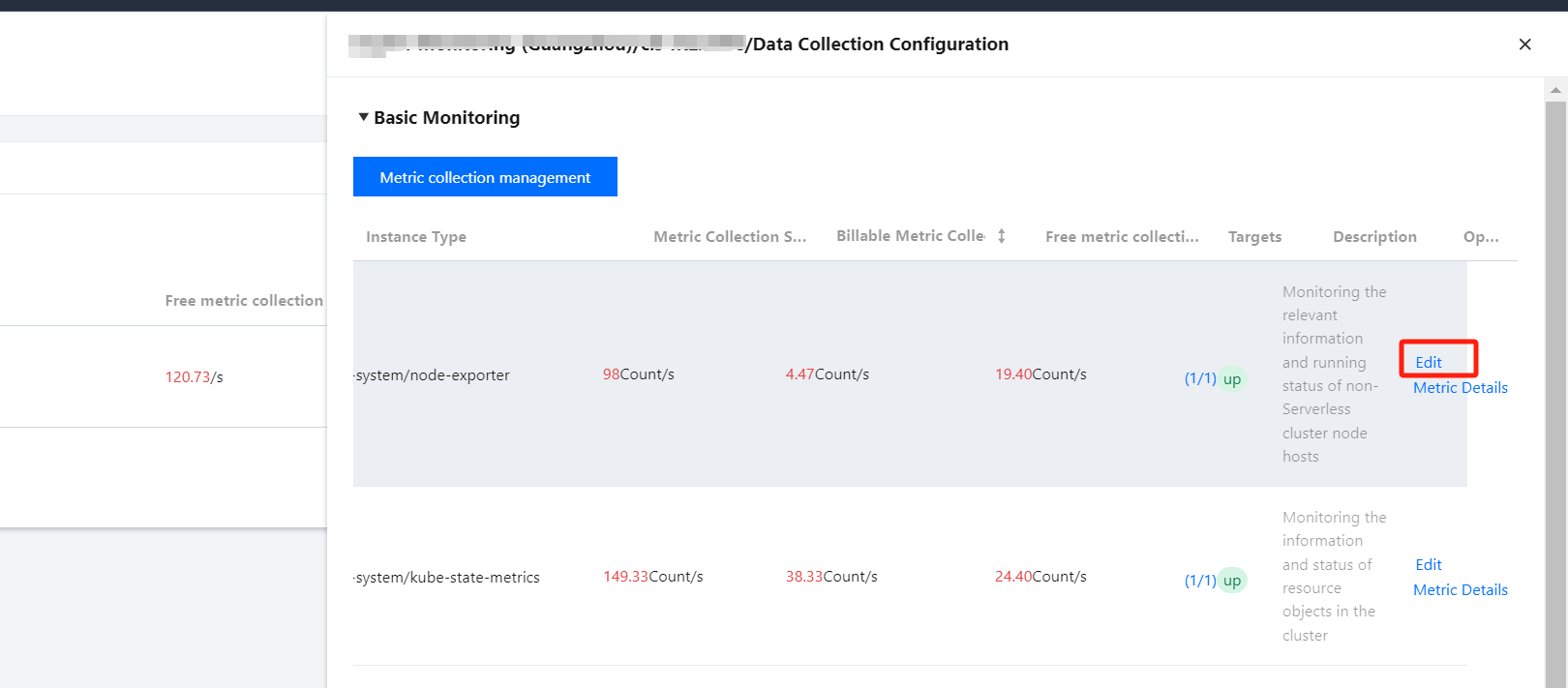
4. In the data collection configuration window, click Edit in the operation bar, as shown below:


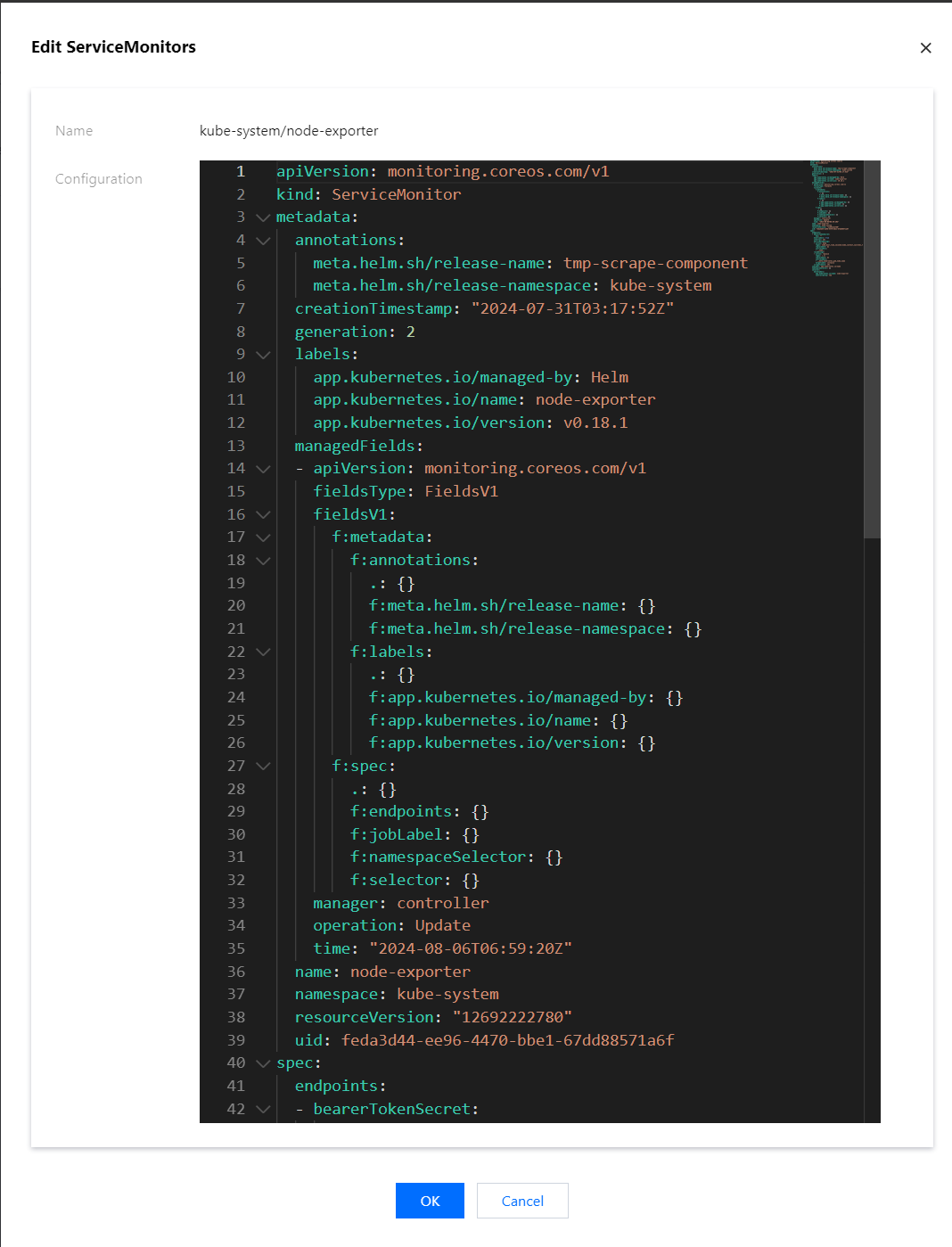
5. Find the interval field, which represents the collection interval. You can increase its value to reduce data storage costs, as shown below:


6. Click Confirm after completing the configuration.

Adjusting Collection Interval via Integration Center

Note:
The Scraping Task application should have been installed and integrated. If it is not installed, click One-click installation on the right before you proceed with the following steps.
1. Log in to the TCOP console, and click Prometheus Monitoring in the left sidebar.
2. On the instance list page, select the name of the instance that requires configuring data collection rules and enter its details page.
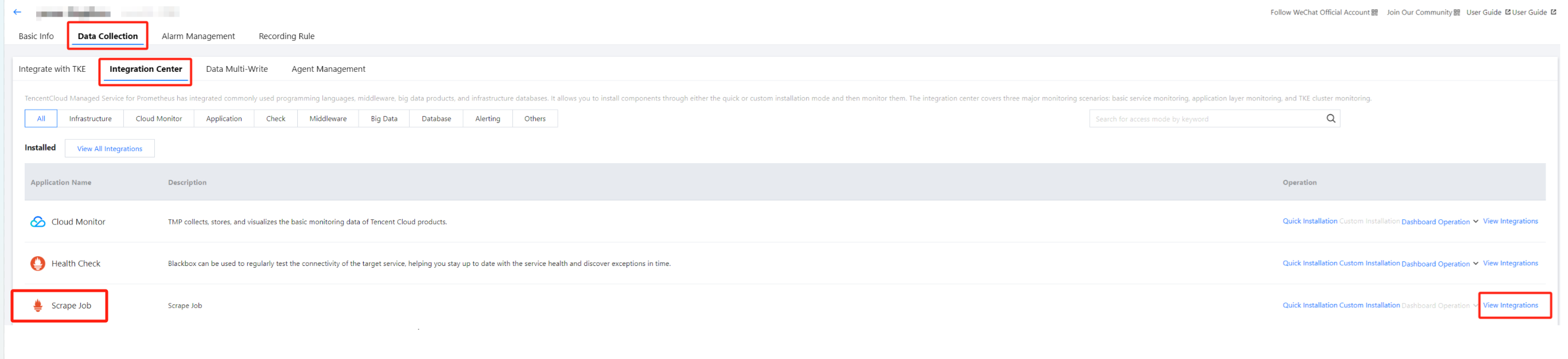
3. On the Data Collection page, click Integration Center, find Scrape Job, and click View Integrations on the right, as shown below:


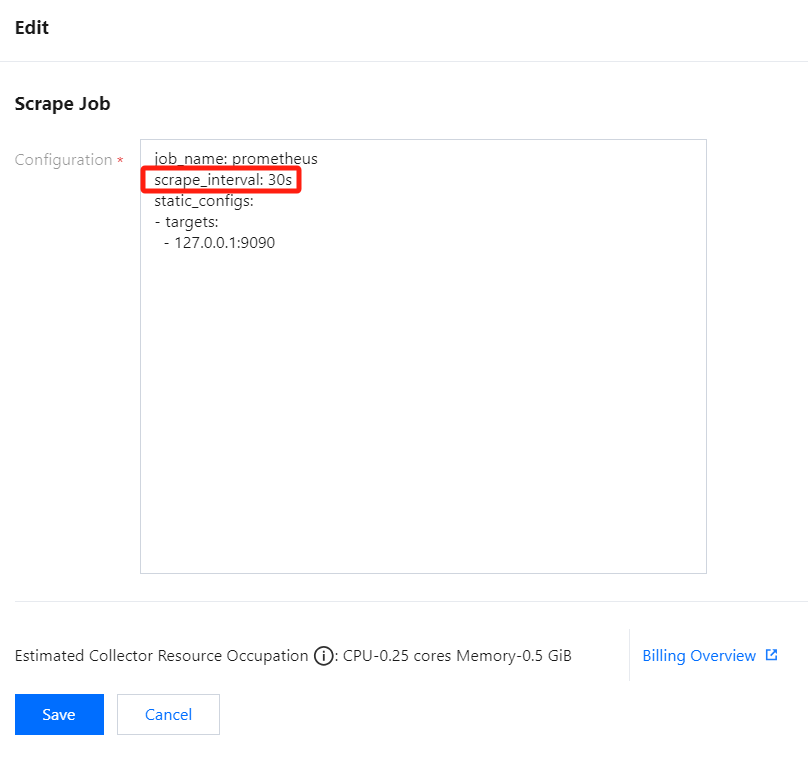
4. On the page that appears, click any name to enter the collection tasks configuration page. Then, find the scrape_interval field, which represents the collection interval. You can increase its value to reduce data storage costs, as shown below:


5. Click Save after completing the configuration.

ヘルプとサポート

この記事はお役に立ちましたか?

フィードバック