Archiving Global Data
Download
Mode fokus
Ukuran font
TDMQ for Apache Pulsar pro clusters implement cross-region cluster replication based on the Geo Replication solution. TDMQ for Apache Pulsar pro clusters support scenarios such as cross-region disaster recovery, data archiving, and cross-region consumption.
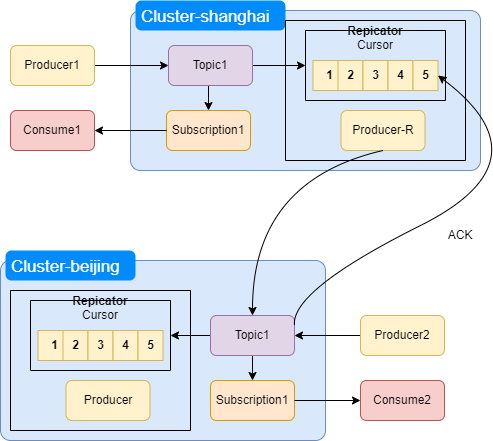
When cross-region replication is enabled in TDMQ for Apache Pulsar, a Replicator will be started in the cluster. For details, see Cluster-Level High Availability. Taking replication from the Shanghai region to the Beijing region as an example:
The Replicator component runs in the Pulsar cluster in the Shanghai region. Within this component, a Producer-R is started and bound to Topic1 of the peer cluster in the Beijing region, sending message data to the Beijing IDC in the form of a producer.
Note:
Messages produced from the cluster in the Shanghai region are first persisted in the local cluster and then asynchronously forwarded to the cluster in the Beijing region.
The Producer-R in the Replicator component of the cluster in the Shanghai region is independent of the client Producer1 in the same cluster. The cluster address configured for Producer-R is the address of the cluster in the Beijing region.
Replication Process Description
1. Producer1 produces a message to Topic1 in the cluster in the Shanghai region;
2. The cluster in the Shanghai region persists the messages to BookKeeper;
3. Upon successful write, BookKeeper triggers delivery of the message to the Cursor within the Replicator component;
4. The Replicator's Cursor sends the message to Topic1 in the cluster in the Beijing region through Producer-R;
5. After Topic1 in the cluster in the Beijing region successfully writes the message to BookKeeper, it sends an acknowledgment message to the Cursor of the Replicator in the cluster in the Shanghai region; upon receiving this acknowledgment message, the Cursor in the Shanghai IDC triggers Producer-R to push the next message.
Operation Guide
1. Log in to the TDMQ for Apache Pulsar console.
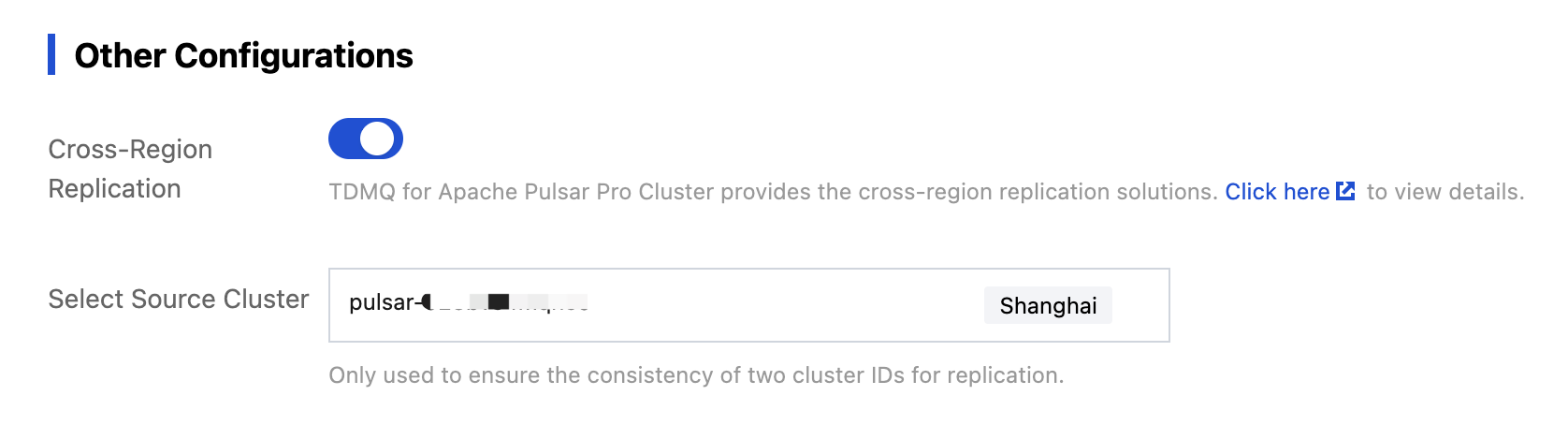
2. Create a pro cluster in the target replication region. On the Cluster Purchase page, you need to enable Cross-Region Replication and select the source cluster.
3. In the left sidebar in the console, select Cross-Region Replication, click New Link, and configure the message data synchronization link for the cluster.
Copy Link Name: Define a name for the synchronization link. It cannot be empty. It can contain digits, letters, and characters "-_=:.". The length cannot exceed 128 characters.
Link Type: Select message-level.
Source Cluster: Select the source TDMQ for Apache Pulsar cluster for data replication.
Select Target Cluster: Select an existing target cluster in another region. Only clusters with the same cluster ID are displayed here.
Replication Level: It supports cluster level, namespace level, and topic level.
The cluster level is suitable for cluster-level replication.
The namespace level is suitable for scenarios where clusters in both regions are active on a daily basis, with different namespaces distributed across regions.
Topic level, the finest granularity for cross-region replication.
Terms and Conditions: Check the box to confirm that I have read and agree to the TDMQ Terms of Service.
4. Click Save to complete the payment.
5. After creation, the message-level replication task will appear on the Monitoring page where you can view real-time metrics such as real-time replication rates and message backlog data.
Bantuan dan Dukungan
Apakah halaman ini membantu?
Anda juga dapat Menghubungi Penjualan atau Mengirimkan Tiket untuk meminta bantuan.
masukan