tencent cloud

TencentDB for CTSDB

CTSDB 정책
개인 정보 보호 정책
데이터 처리 및 보안 계약
문서TencentDB for CTSDB

Iptable Forwarding

포커스 모드
폰트 크기
마지막 업데이트 시간: 2025-04-29 22:44:25

Overview

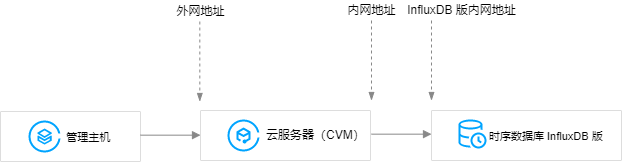
If a user needs to access TencentDB for CTSDB 3.0 on the public network, the user can also perform port forwarding through a Cloud Virtual Machine (CVM) with a public IP address to achieve public network access.
Note:
The iptable forwarding has a stability risk. It is not recommended to use public network access in production environments.

Directions

1. Log in to CVM and enable the IP forwarding feature of CVM.
Note:
The CVM and CTSDB should be in the same account and in the same VPC (ensuring the same region), or in the same basic network.
echo 1 > /proc/sys/net/ipv4/ip_forward
2. Configure forwarding rules. The following example shows how to forward the access to 26.xx.x.2:10001 (public network address of CVM, and the port can be selected manually) to a CTSDB 3.0 instance with a private network address of 10.0.0.5:8086.
iptables -t nat -A PREROUTING -p tcp --dport 10001 -j DNAT --to-destination 10.0.0.5:8086
iptables -t nat -A POSTROUTING -d 10.0.0.5 -p tcp --dport 8086 -j MASQUERADE
3. Configure CVM Security Group, allow access to the public network port of the CVM. It is recommended that the security group rule only allow access from the source addresses that need to access.
4. Connect to the CTSDB 3.0 instance in the private network via the public network address (which is 26.xx.xx.2:10001 in this example) on the access side. The connection command is the same as the private network connection command. See influx CLI Client for the command.

도움말 및 지원

문제 해결에 도움이 되었나요?

피드백