Cross-Region Backup
Baixar
Modo Foco
Tamanho da Fonte
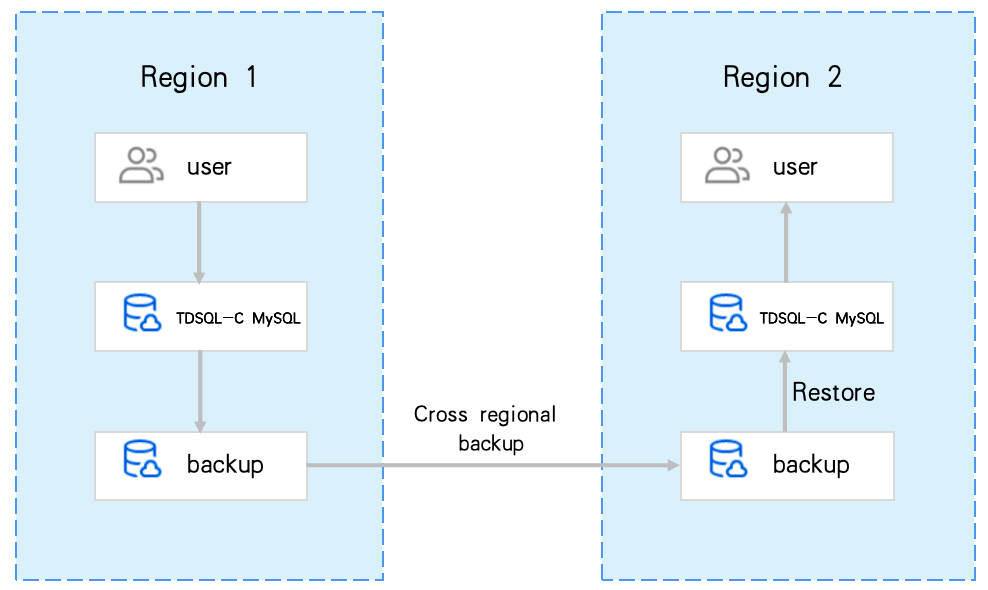
TDSQL-C for MySQL provides a cross-region backup feature, supporting the storage of backup files in another region. This helps users enhance compliance and disaster recovery capabilities while improving data reliability. This article describes the cross-region backup feature.
Background
Data is an important part of enterprise operations. Although the information technology brings convenience, it also reveals that electronic data and stored information are very vulnerable to damage or loss. Any incident, such as natural disaster, system failure, maloperation, or virus, can cause interruption of business operations or even disastrous losses. Therefore, ensuring the security and integrity of core data is a top priority of every enterprise. The cross-region backup feature of Cloud Native Database TencentDB for CynosDB can be used to store backup files in another region so as to minimize data corruptions caused by natural disasters or system failures. This feature ensures the high availability, security, and recoverability of data and implement various features, such as remote backup and restoration, remote disaster recovery, long-term data archive, and regulatory compliance.
Cross-Region Backup Limitations
Only high-IO clusters support cross-region backups for: automatic snapshot backups, automatic logical backups, manual snapshot backups, manual logical backups (entire cluster), and log backups.
Notes on Cross-Region Backup
Cross-region backup can restore data to the region where the cluster or the backup is.
Cross-region backup doesn't affect the local default backup, and both coexist after cross-region backup is enabled.
Cross-region backup will be triggered after the local default automatic backup is complete, that is, the default automatic backup is dumped to the storage device for cross-region backup.
Billing Description
Cross-region backup is currently in the public testing phase, and is presently available for use without charge.
Differences Between Cross-Region Backup and Local Backup
Comparison Item | Cross-Region Snapshot or Logical Backup | Local Automatic Snapshot Backup |
Is it enabled by default | It is disabled by default and requires manual enabling. | Enabled by default |
Backup storage region | Backup is stored in the specified remote region (up to three regions) | Backup is stored in the region where the cluster is located |
Backup and restoration | Data can be restored to: Original cluster New cluster in the target region | Can be restored to: Original cluster New cluster in the current region |
Supported Regions
The regions supporting cross-region backup span all the regions in TDSQL-C for MySQL.
Enabling Cross-Region Backup for Automatic Snapshot or Logical Backups
Note:
After cross-region backup is enabled for automatic snapshot or logical backups, we recommend that you also enable cross-region binlog backup in the corresponding region. This allows you to perform point-in-time rollbacks in that region.
1. Log in to the TDSQL-C for MySQL console.
2. At the top, select a region and operate according to the console view pattern currently in use.
On the left side of the cluster list, click Target Cluster to enter the cluster management page.

Find the target cluster in the cluster list on the left and click the cluster ID or Manage in the Operation column to access the cluster management page.

3. On the cluster management page, select Backup Management tab, then click Auto-Backup Settings.

4. In the pop-up window, follow the steps below to enable cross-region backup for automatic snapshot or logical backups.
1. Choose Snapshot Backup > Backup Retention Region, and click Edit.
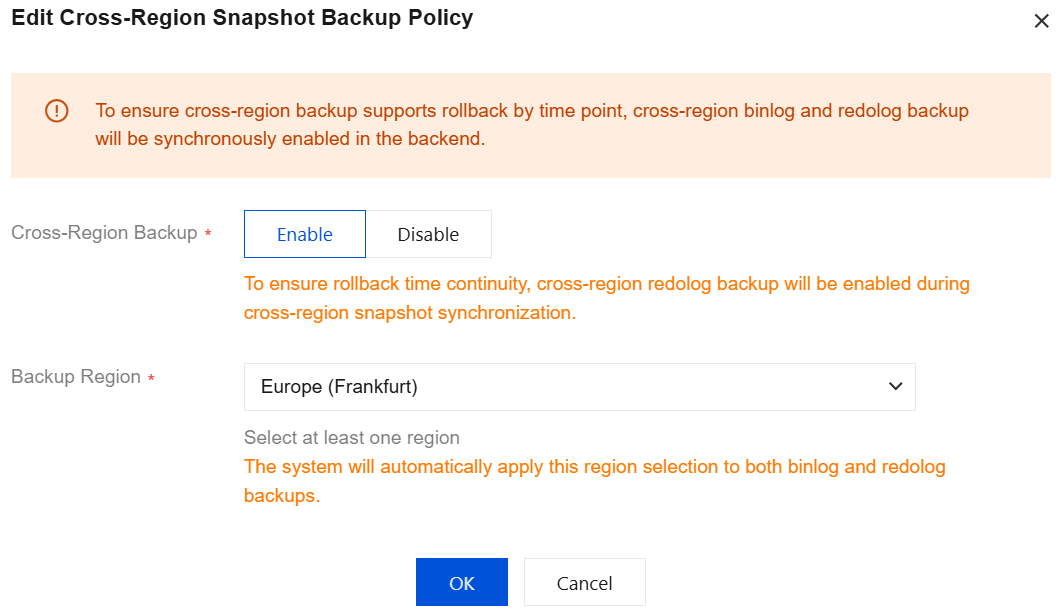
2. In the pop-up window, click Enable, select the Backup Region (up to three different regions can be selected), and click OK.
Note:
After the cross-region backup feature for automatic snapshot backups is enabled or disabled, the system will enable or disable cross-region binlog and redolog backups to ensure point-in-time rollback is supported for cross-region backups.
The file retention policy for cross-region backups is consistent with that for automatic snapshot backups. For details and configuration methods, see Automatic Backup.
1. Under Logical Backup, click Enable and Set.
Note:
If automatic logical backup is already enabled but its cross-region backup feature is not enabled, please click Modify Backup Settings.

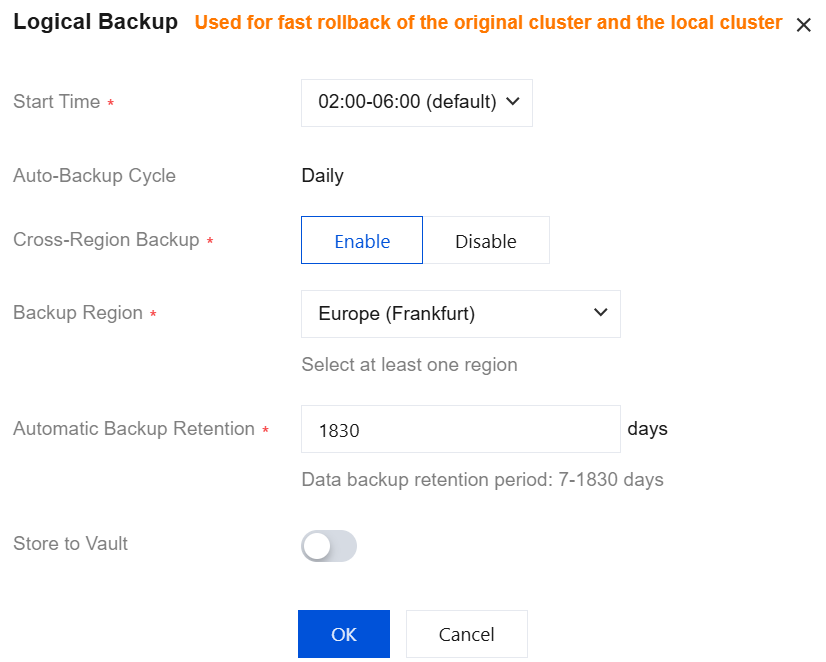
2. In the pop-up dialog box, complete the following configurations and click OK.
Parameter | Description |
Start Time | Set the daily start time for automatic logical backups. The default value is 02:00 - 06:00. |
Automatic Backup Cycle | The default value is Daily. Note: The current version only supports a daily automatic backup cycle. Due to the logical backup rate limit, the backup cycle for certain clusters with large data volumes may extend beyond one day (if a logical backup is not completed on a given day, the next automatic logical backup will be performed on the day after the current one completes). |
Cross-Region Backup | Select to enable cross-region backup. |
Backup Region | Select the regions for backup storage. You can select up to three different regions. |
Automatic Backup Retention | Backups can be retained for 7 - 1830 days. |
Store to Vault | If this option is enabled, automatic logical backups will be delivered to the backup vault for storage. For details on the backup vault, see Backup Vault. |
Select Vault | If "Store to Vault" is enabled, you can select the target backup vault for storage. |
Enabling Cross-Region Backup for Log Backups
1. Log in to the TDSQL-C for MySQL console.
2. At the top, select the region and operate according to the console view pattern currently in use.
On the left side of the cluster list, click on the desired cluster to enter the cluster management page.
Find the target cluster in the cluster list on the left and click Cluster ID or Manage in Operation column to access the cluster management page.
3. On the cluster management page, select the Backup Management tab and click Log Backup Settings.

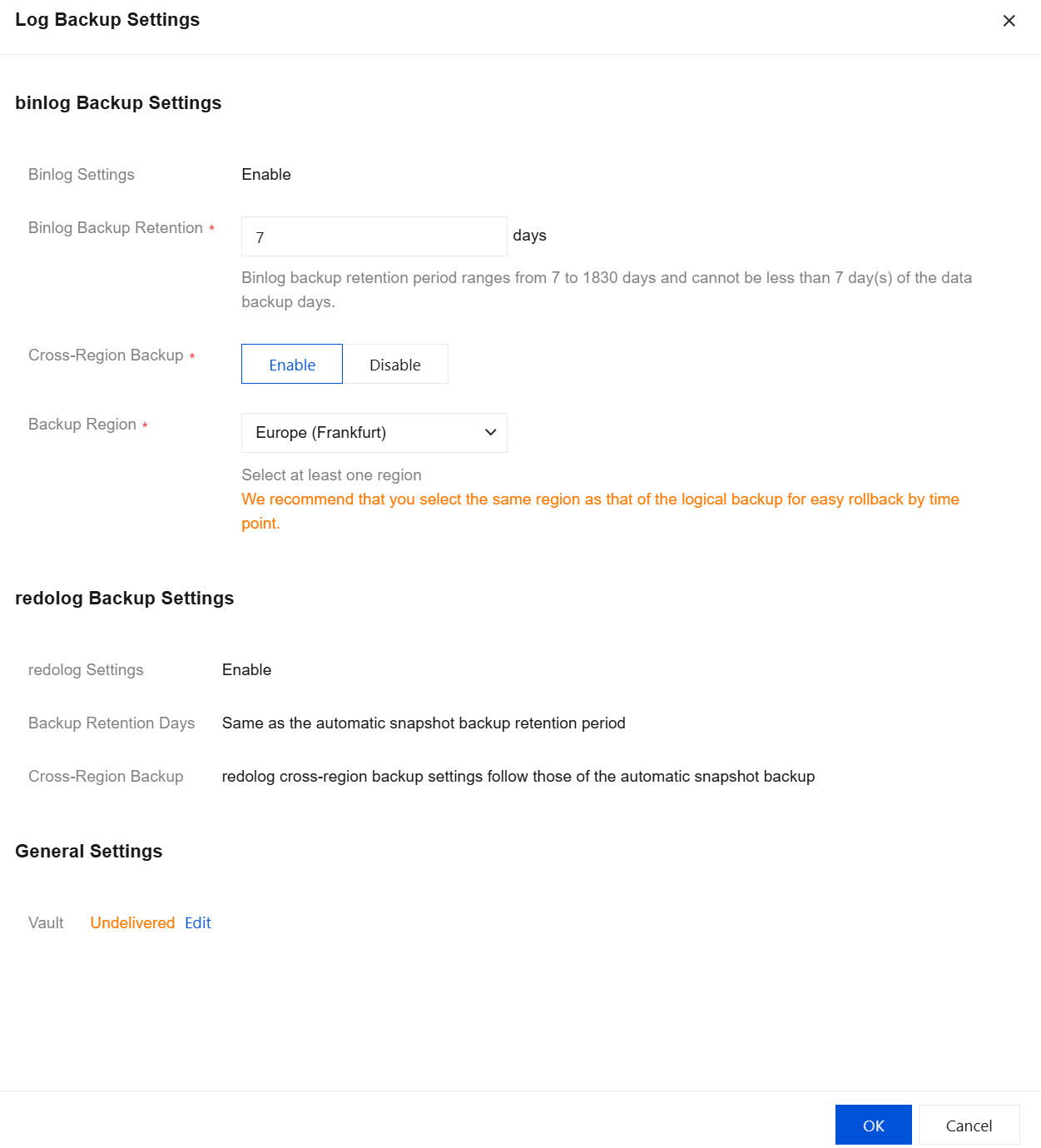
4. In the pop-up dialog box, complete the following configuration and click OK.
Parameter | Description |
Binlog Settings | Enable by default. |
Binlog Backup Retention | Binlog backup retention period lasts 7 to 1,830 days, which must not be less than the data backup retention period of 7 days. |
Cross-Region Backup | Select if the cross-region backup should be enabled. If it is Enable, binlog backups can be stored in other regions. If it is Disable, binlog backups will be kept in the region where the cluster is currently located by default. |
Backup Region | When enabling cross-region backup, you can select the region where the backup is stored, supporting up to six different regions. |
redolog Settings | This is Enable by default. |
Backup Retention Days | Backup retention period for redolog, in days. The retention period is the same as that for automatic snapshot backups. |
Cross-Region Backup | Cross-region backup setting for redolog. The setting is the same as that for automatic snapshot backups. |
Vault | By default, backups are not delivered to a vault. You can click Edit and select a target backup vault for backup storage. For details, see Backup Vault. |
Enabling Cross-Region Backup for Manual Snapshot or Logical Backups
1. Log in to the TDSQL-C for MySQL console.
2. At the top, select the region and operate according to the console view pattern currently in use.
On the left side of the cluster list, click the desired cluster to enter the cluster management page.
Find the target cluster in the cluster list on the left and click Cluster ID or Manage in Operation column to access the Cluster Management page.
3. On the cluster management page, click Backup Management and then click Manual Backup.

4. In the pop-up dialog box, complete the following configuration, then click OK to create a backup task.
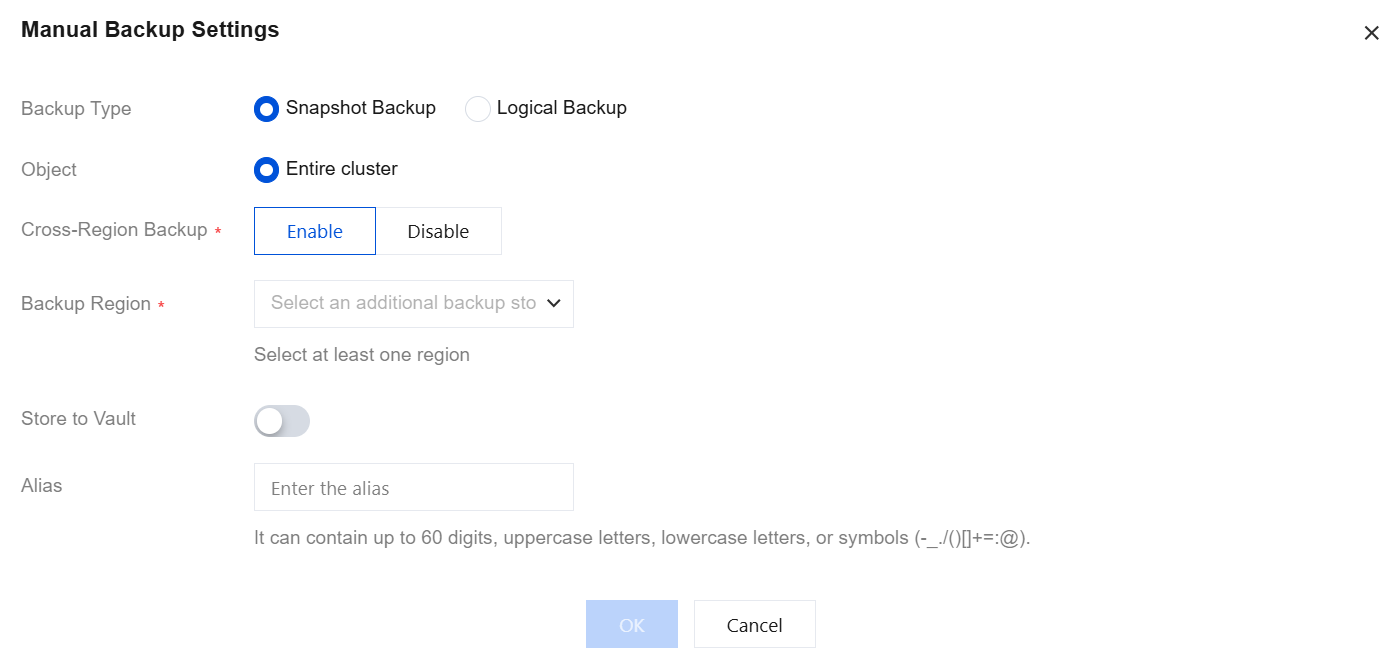
Parameter | Description |
Backup Type | Snapshot Backup and Logical Backup are supported. Note: We recommend you perform a manual logical backup task during off-peak hours, as it will lock the database and affect database use. |
Object | Snapshot Backup applies to the Entire cluster, while Logical Backup applies to the Entire cluster or Specify Table. If you select Specify Table, you can choose specific databases and tables for manual backup. |
Cross-Region Backup | You can choose whether to enable cross-region backup for Snapshot Backup (for the Entire cluster) and Logical Backup (for the Entire cluster). If this is enabled, backup files can be saved to other regions. If not enabled, the reserved region for the manual logical backup is the current cluster's region by default. |
Backup Region | If Cross-Region Backup is enabled, you can select up to three different regions to store the backup files. |
Store to Vault | If this option is enabled, manual backups will be delivered to the backup vault for storage. For details on the backup vault, see Backup Vault. Note: Manual snapshot backups for the entire cluster, manual logical backups for the entire cluster, and manual logical backups for specified databases and tables all support the "Store to Vault" parameter. |
Select Vault | If "Store to Vault" is enabled, you can select the target backup vault for storage. |
Alias | When you create a manual backup, you can set an alias for the backup file. The alias can contain only digits, uppercase and lowercase letters, Chinese characters, and special characters (-_./()[]()+=:;@), with a maximum length of 60 digits. |
Related APIs
API | Description |
This API (DescribeBackupConfig) is used to obtain the backup configuration information of the specified cluster, including the full backup time window and the backup file retention period. | |
This API (ModifyBackupConfig) is used to modify the backup configuration of the specified cluster. | |
This API (DescribeBinlogConfig) is used to query binlog configuration. | |
This API (ModifyBinlogConfig) is used to modify binlog configuration. |
Ajuda e Suporte
Esta página foi útil?
Você também pode entrar em contato com a Equipe de vendas ou Enviar um tíquete em caso de ajuda.
comentários