Editing and Deleting Tag
Unduh
Mode fokus
Ukuran font
You can edit, modify, set, and unbind the cluster tags by the following steps.
Prerequisite
You have created the tags and bound the resources. For more information, see Creating Tag and Binding Resource.
Directions
Option 1
1. Log in to the TDSQL-C for MySQL console.
2. Select the region at the top of the page and click the cluster ID or Manage in the Operation column to enter the cluster management page.
3. On the cluster details page, click 
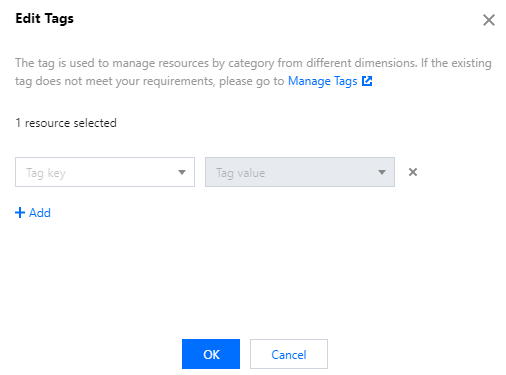
4. In the pop-up window, you can edit, modify, set, and unbind the cluster tags. After confirming that everything is correct, click OK.
Option 2
1. Log in to the TDSQL-C for MySQL console.
2. Select a region at the top of the page, select More > Edit Tag in the Operation column of the target cluster in the cluster list.

3. In the pop-up window, you can edit, modify, set, and unbind the tags. After confirming that everything is correct, click OK.
Note:
To edit tags for multiple clusters, select the target clusters in the cluster list, and select More > Edit Tag at the top of the list.
Bantuan dan Dukungan
Apakah halaman ini membantu?
Anda juga dapat Menghubungi Penjualan atau Mengirimkan Tiket untuk meminta bantuan.
masukan