tencent cloud

TDSQL-C for MySQL

Release Notes and Announcements
Release Notes
Product Announcements
Beginner's Guide
Product Introduction
Overview
Strengths
Use Cases
Architecture
Product Specifications
Instance Types
Product Feature List
Database Versions
Regions and AZs
Common Concepts
Use Limits
Suggestions on Usage Specifications
Kernel Features
Kernel Overview
Kernel Version Release Notes
Optimized Kernel Version
Functionality Features
Performance Features
Security Features
Stability Feature
Analysis Engine Features
Inspection and Repair of Kernel Issues
Purchase Guide
Billing Overview
Product Pricing
Creating Cluster
Specification Adjustment Description
Renewal
Payment Overdue
Refund
Change from Pay-as-You-Go to Yearly/Monthly Subscription
Change from Pay-as-You-Go to Serverless Billing
Value-Added Services Billing Overview
Viewing Billing Statements
Getting Started
Database Audit
Overview
Viewing Audit Instance List
Enabling Audit Service
Viewing Audit Logs
Log Shipping
Post-Event Alarm Configuration
Modifying Audit Rule
Modifying Audit Service
Disabling Audit Service
Audit Rule Template
Viewing Audit Task
Authorizing Sub-User to Use Database Audit
Serverless Service
Serverless Introduction
Creating and Managing a Serverless Cluster
Elastic Scaling Management Tool
Serverless Resource Pack
Multi-AZ Deployment
Configuration Change
FAQs
Serverless Cost Estimator
Operation Guide
Operation Overview
Switching Cluster Page View in Console
Database Connection
Instance Management
Configuration Adjustment
Instance Mode Management
Cluster Management
Scaling Instance
Database Proxy
Account Management
Database Management
Database Management Tool
Parameter Configuration
Multi-AZ Deployment
GD
Backup and Restoration
Operation Log
Data Migration
Parallel Query
Columnar Storage Index (CSI)
Analysis Engine
Database Security and Encryption
Monitoring and Alarms
Basic SQL Operations
Connecting to TDSQL-C for MySQL Through SCF
Tag
Practical Tutorial
Classified Protection Practice for Database Audit of TDSQL-C for MySQL
Upgrading Database Version from MySQL 5.7 to 8.0 Through DTS
Usage Instructions for TDSQL-C MySQL
New Version of Console
Implementing Multiple RO Groups with Multiple Database Proxy Connection Addresses
Strengths of Database Proxy
Selecting Billing Mode for Storage Space
Creating Remote Disaster Recovery by DTS
Creating VPC for Cluster
Data Rollback
Solution to High CPU Utilization
How to Authorize Sub-Users to View Monitoring Data
White Paper
Security White Paper
Performance White Paper
Troubleshooting
Connection Issues
Performance Issues
API Documentation
History
Introduction
API Category
Making API Requests
Instance APIs
Multi-Availability Zone APIs
Other APIs
Audit APIs
Database Proxy APIs
Backup and Recovery APIs
Parameter Management APIs
Billing APIs
serverless APIs
Resource Package APIs
Account APIs
Performance Analysis APIs
Data Types
Error Codes
FAQs
Basic Concepts
Purchase and Billing
Compatibility and Format
Connection and Network
Features
Console Operations
Database and Table
Performance and Log
Database Audit
Between TDSQL-C for MySQL and TencentDB for MySQL
Service Agreement
Service Level Agreement
Terms of Service
TDSQL-C Policy
Privacy Policy
Data Privacy and Security Agreement
General References
Standards and Certifications
Glossary
Contact Us

Purchase and Billing

PDF
Focus Mode
Font Size
Last updated: 2026-03-24 16:23:31

How do I reduce the costs of TDSQL-C for MySQL?

TDSQL-C for MySQL reduces TCO through pooling, features minimalist software optimizations, and supports common networks and hardware devices to release the hardware dividend. It has an elastic scaling feature and a built-in high availability architecture, where fast scaling capabilities greatly reduce the wastes of computing and storage resources. In addition, it is more cost-effective than traditional commercial databases with the same high performance and reliability.
TDSQL-C for MySQL offers flexible billing modes and specification adjustment capabilities, so you can scale cluster resources largely based on your business conditions and reasonably query the approximate costs of required resources before deploying your business. The computing-storage separation architecture further allows you to adjust the specification on demand with no need to select a certain combination. Instead of upgrading or downgrading both the compute node and storage space specifications within the fixed range, you can easily adjust the compute node and storage space separately as needed. This helps you implement fine-grained cost management to the greatest extent.

What are the billable items of TDSQL-C for MySQL?

The billable items of TDSQL-C for MySQL include compute node, storage space, backup (free of charge currently), and database audit (optional). For more information, see Billing Overview.

What types of files will use the storage space?

Such files include data files, index files, log files (redo, undo, slow, and error logs), temporary files, and a small number of system files. For more information, see Billing Overview.

What billing modes does TDSQL-C for MySQL support?

TDSQL-C for MySQL adopts a computing-storage separation architecture, so the compute nodes and storage space can be billed separately in different billing modes:
The billing modes of compute nodes include yearly/monthly subscription, pay-as-you-go, and serverless.
The billing modes of the storage space include yearly/monthly subscription (available only when the billing mode of compute nodes is yearly/monthly subscription) and pay-as-you-go.

How do I choose an appropriate billing mode?

If your business peak traffic fluctuates greatly, you only use the database infrequently in the development and test environments, or you use SaaS in scenarios such as website building for small and medium-sized enterprises, we recommend you choose the serverless billing mode. In this mode, the database can automatically start, stop, and scale based on the business load in an imperceptible manner without causing disconnections, and the service is billed by the actual computing and storage resource usage.
If your business has a stable traffic and runs for a long term, we recommend that you choose the yearly/monthly subscription billing mode. In this mode, the longer the purchase period, the higher the discount as displayed on the purchase page.
If your business often fluctuates greatly and instantaneously, we recommend that you choose the pay-as-you-go billing mode. In this mode, instances can be released immediately after use to reduce the costs.
If you need a large storage space, you can choose the yearly/monthly subscription billing mode. In this mode, the storage space is billed in a tiered manner. If the used storage space exceeds 3,000 GB, you can enjoy a even lower unit price.
For more information on storage space pricing, see Selecting Billing Mode for Storage Space.

Which billing modes does a TDSQL-C for MySQL read-only instance support?

The computing and storage billing modes of a TDSQL-C for MySQL read-only instance must be the same as those of its source instance.
If both the computing and storage space billing modes of the source instance are yearly/monthly subscription, you can only add read-only instances with the yearly/monthly subscription billing mode for both computing and storage space.
If the computing and storage space billing modes of the source instance are yearly/monthly subscription and pay-as-you-go respectively, you can only add read-only instances with the yearly/monthly subscription billing mode for computing and pay-as-you-go billing mode for storage space.
If both the computing and storage space billing modes of the source instance are pay-as-you-go, you can only add read-only instances with the pay-as-you-go billing mode for both computing and storage space.
In serverless billing mode, you cannot add read-only instances.

Does TDSQL-C for MySQL charge for the backup space?

The backup storage space of TDSQL-C for MySQL is free of charge currently and will be billed on a pay-as-you-go basis as needed in the future. Therefore, plan your backup storage files reasonably.

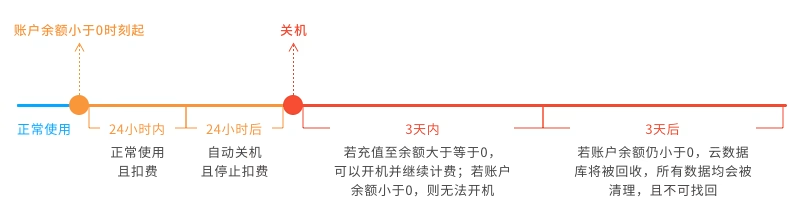
Will my pay-as-you-go cluster be eliminated immediately when my account balance becomes negative?

No. The moment your account balance becomes negative:
You can continue to use your TDSQL-C for MySQL cluster in 24 hours. We will continue to bill you for this period.
After 24 hours, your TDSQL-C for MySQL cluster will be automatically isolated and moved into the recycle bin, and the billing will stop.
If you top up your account within 3 days after the isolation to a positive balance, the billing will continue, and the cluster will be automatically recovered for normal use.
If your account balance remains negative after 3 days, the isolated cluster will be deactivated and put into the repossession queue. After it is repossessed, all data in it will be cleared and cannot be recovered.


How do I purchase TDSQL-C for MySQL?

You can purchase TDSQL-C for MySQL in the following two ways:
Create a cluster in the console.
You can click Create in the Cluster List to quickly purchase a cluster. This method is suitable for existing TencentDB users.
Directly purchase the service on the purchase page.
You can purchase a cluster on the purchase page. This method is suitable for new TencentDB users.
Before using either method, you must register a Tencent Cloud account and complete identity verification.
To register a Tencent Cloud account:Click here to sign up for a Tencent Cloud account.
To complete identity verification:Click here to verify your identity.
You need to set the database configuration, basic information, and advanced configuration in both purchase methods. For more information on the configuration, see Purchase Methods.

How do I change the billing mode of a pay-as-you-go cluster to yearly/monthly subscription?

TDSQL-C for MySQL implements this change by generating a renewal order. You can select More > Pay-as-You-Go to Yearly/Monthly Subscription in the Operation column in the Cluster List for change.
Rest assured that access to your business will not be affected during the change from pay-as-you-go billing to yearly/monthly subscription billing. However, a yearly/monthly subscribed cluster cannot be changed back to a pay-as-you-go cluster.

How do I change the billing mode of a pay-as-you-go cluster to serverless?

TDSQL-C for MySQL converts the cluster type on the backend to change the billing mode from pay-as-you-go to serverless. After conversion, the billing mode is a postpaid billing mode, where you can set the maximum and minimum computing power values as needed first and will be charged based on the actual usage of computing and storage resources upon settlement. During the change from pay-as-you-go billing to serverless billing, the database can be accessed normally but will experience a momentary disconnection at the time point of change. Therefore, we recommend you configure an automatic reconnection feature for your application. However, a serverless cluster cannot be changed back to a pay-as-you-go cluster. For detailed directions, see Change from Pay-as-You-Go to Serverless Billing.

How do I renew a TDSQL-C for MySQL cluster?

You can manually renew or set automatic renewal for one or multiple TDSQL-C for MySQL clusters in the console. If you have many resources under your account, you can configure renewal settings in the Renewal Management Center, such as batch cluster renewal, automatic renewal, and unified expiration date.

How do I delete a cluster?

If you are sure that you no longer need a cluster, you can find it in the Cluster List and select More > Delete in the Operation column to delete it.
Note:
After a cluster is deleted, all instances (including read-write and read-only instances) in it will also be automatically deleted.
After a pay-as-you-go cluster is deleted, its billing will stop automatically.
If a yearly/monthly subscribed cluster is deleted before it expires, the fees of all instances in it will be calculated again by the usage duration at the pay-as-you-go price, and your original payment will be refunded after fees incurred are deducted from it.

How do I restore an instance?

You can restore accidentally deleted, expired, or suspended instances from the recycle bin before they are terminated.
Note:
Read-only instances can be restored only after the read-write instance is restored.
You can only restore an instance before it is terminated.
If you click Terminate in the Operation column, the instance will be eliminated immediately and cannot be restored. Therefore, proceed with caution.


Help and Support

Was this page helpful?

Help us improve! Rate your documentation experience in 5 mins.

Feedback