This document describes how to add a CNAME record. If you want to point a domain name to another one which provides an IP address, you need to add a CNAME record.
Prerequisites
You have created the corresponding private domain.
Directions
Note:
You can add only one CNAME record for each host, and it cannot coexist with any other records.
You can add only one CNAME record for each host, and it cannot coexist with any other records.If anything goes wrong during this process, please contact us.
1. Log in to the Private DNS console and click Private Domain List on the left sidebar to enter the private domain list.
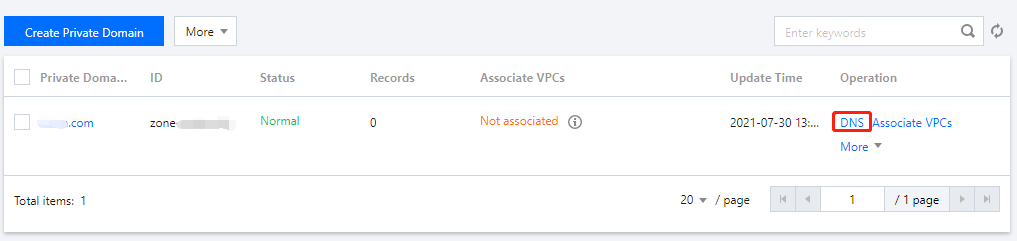
2. In the Private Domain List, click the name of the private domain for which you need to create a CNAME record or DNS as shown below:
3. On the DNS Records tab, click Add Record and enter the following record value information as shown below:
Note:
You can add up to 5 round-robin DNS records of the same record type for the same host.
Host: enter a subdomain. For example, when adding a record for www.dnspod.cn, you can simply select www in the Host field. If you want to add a record for dnspod.cn, select @ in the Host field.
Record Type: select CNAME.
Record Value: you can only enter a domain name to which the CNAME record points, such as https://cloud.tencent.com.
Weight: it refers to configuring multiple record values for the same host on the DNS server. In this way, when the server responds to DNS queries, all record values will return different DNS results according to the preset weights and distribute the resolved traffic to different servers, so as to implement load balancing. The weight value can be an integer between 1 and 100.
MX Priority: leave it empty.
TTL: it is the cache time and 300s by default. The smaller the value, the faster the change to the record will take effect. You can enter an integer between 1 and 86400.