tencent cloud
最新优惠
产品
解决方案
价格中心
合作伙伴网络
云市场
探索更多
Prev
Next
弹性微服务
动态与公告
公告
产品动态
产品简介
产品概述
产品优势
应用场景
购买指南
计费概述
产品定价
欠费与停服说明
快速入门
步骤1:获取访问权限
步骤2:创建环境
步骤3:创建应用
步骤4:部署应用
操作指南
环境管理
应用管理
权限管理
查看变更记录
实践教程
Github Actions 在 TEM 中的使用
托管静态网站
弹性微服务应用访问公网(通过 NAT 网关)
弹性微服务应用访问公网(通过 API 网关)
弹性微服务应用运行失败故障排查指南
使用 API 网关快速访问 TEM 应用
Java 应用调优实践教程
API 文档
History
Introduction
API Category
Making API Requests
Environment APIs
ModifyIngress
Resource APIs
Application APIs
Service APIs
RollingUpdateApplicationByVersion
Access Policy APIs
Configuration file APIs
Log collecting APIs
Scaling Rule APIs
Application Version APIs
Other APIs
Workload APIs
Data Types
Error Codes
常见问题
弹性微服务配置
联系我们
词汇表
TEM 政策
隐私政策
数据处理和安全协议
文档
弹性微服务
操作指南
环境管理
添加环境资源
添加环境资源
Download
聚焦模式
字号
最后更新时间: 2024-01-09 12:40:53
操作场景
本文档主要介绍在弹性微服务控制台中添加环境资源的具体步骤。
操作步骤
1.
登录
弹性微服务控制台
。
2.
在
环境
页面,选择部署地域后,单击目标环境卡片下方的
查看详情
,进入环境基本信息页面。
3.
选择页面上方
资源管理
页签,单击
添加
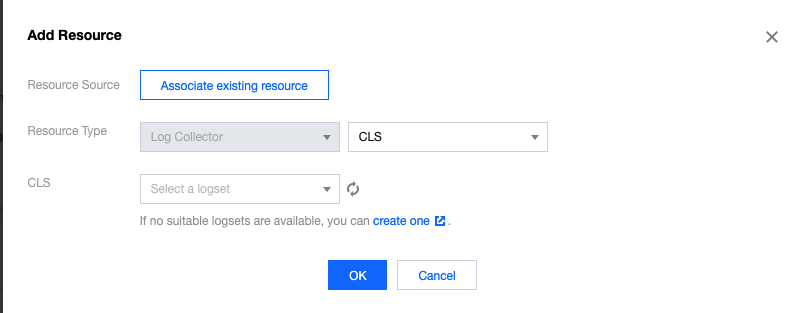
可添加存储、日志或注册中心资源。
存储:选择已有的存储资源。如果没有合适的文件系统,您可以前往新建
文件系统 CFS
。
日志:选择已有的日志资源。如果没有合适的日志集,您可以前往新建
日志集
。
上一篇: 创建环境
下一篇: 配置应用访问与路由
帮助和支持
本页内容是否解决了您的问题?
是
否
您也可以
联系销售
或
提交工单
以寻求帮助。
填写满意度调查问卷,共创更好文档体验。
点击前往
文档反馈