tencent cloud

StreamPackage

Updates and Announcements
StreamPackage to Become Paid Product
Introduction
Purchase Guide
Billing Details
Overdue Payments and Service Suspension
Console Guide
Channel Management
Harvest Jobs
Server-Side Ad Insertion
Channel Linear Assembly
Usage Statistics
Log Management
Practical Application
Implementing Live Streaming
Configuring Multi-DRM
Configuring SSAI AD Insertion
Create FAST(Free Ad-Supported Streaming TV)Channel
SSAI Click-through
Query Playback Data
API Documentation
History
Introduction
API Category
Making API Requests
Channel Management APIs
Advertising Insertion Configuration Management APIs
Channel linear assembly management APIs
VOD remux task APIs
Usage Query APIs
HarvestJob Management APIs
Data Types
Error Codes
StreamPackage Policy
Data Processing and Security Agreement
Privacy Policy
Related Agreement
Service Level Agreement

Inserting Ad Marker

PDF
Focus Mode
Font Size
Last updated: 2025-04-16 11:26:21
StreamPackage SSAI allows only recognizing specified types of SCTE-35 markers as ad markers for processing.

HLS supported ad markers

StreamPackage SSAI service supports identifying the following types of ad markers in HLS manifests
EXT-X-CUE-OUT and EXT-X-CUE-IN
#EXT-X-CUE-OUT:DURATION=120
...
#EXT-X-CUE-IN
#EXT-X-CUE-OUT:30.000
...
#EXT-X-CUE-IN
#EXT-X-CUE-OUT
...
#EXT-X-CUE-IN
Enhanced SCTE-35
#EXT-OATCLS-SCTE35:/AAgAAAAAAAAAAAADwUAAAABAPCAABSZcAAAAAAAABcABfA=
#EXT-X-CUE-OUT:15
...
#EXT-X-CUE-OUT-CONT:ElapsedTime=4,Duration=15,SCTE35=/AAgAAAAAAAAAAAADwUAAAABAPCAABSZcAAAAAAAABcABfA=
...
#EXT-X-CUE-IN
EXT-X-DATERANGE
#EXT-X-DATERANGE:ID="1852585_2g9l0824",START-DATE="2024-12-09T16:05:11.839+08:00",DURATION=30.000,PLANNED-DURATION=30.000,SCTE35-OUT=0xFC002F0000000000FF000014056FFFFFF000E011622DCAFF000052636200000000000A0008029896F50000008700000000

Ad marker handling

StreamPackage SSAI replaces the EXT-X-CUE-OUT, EXT-X-CUE-OUT-CONT, and EXT-X-CUE-IN tags in the input manifest with the EXT-X-DISCONTINUITY tag in the output manifest.
The EXT-X-DISCONTINUITY tag appears at the following boundaries:
Where the source stream switches to an ad
Where one ad switches to another ad
Where the ad switches back to the source stream

Use StreamLive to insert ad markers for live streams

1. Refer to the Implementing Live Steaming in the StreamLive feature guide to implement StreamLive streaming.
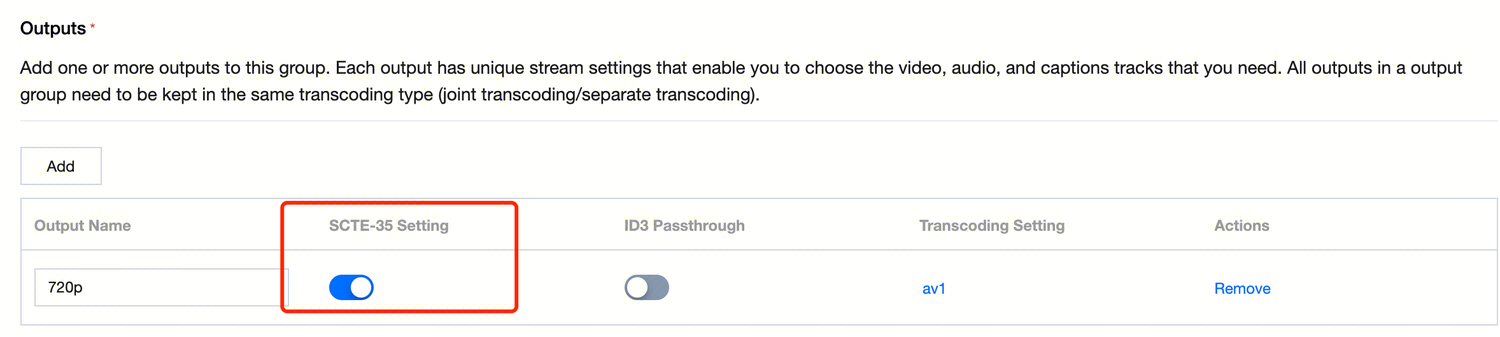
2. Turn on the SCTE-35 pass-through function in the Output of the StreamLive channel.
image.png#608px #137px


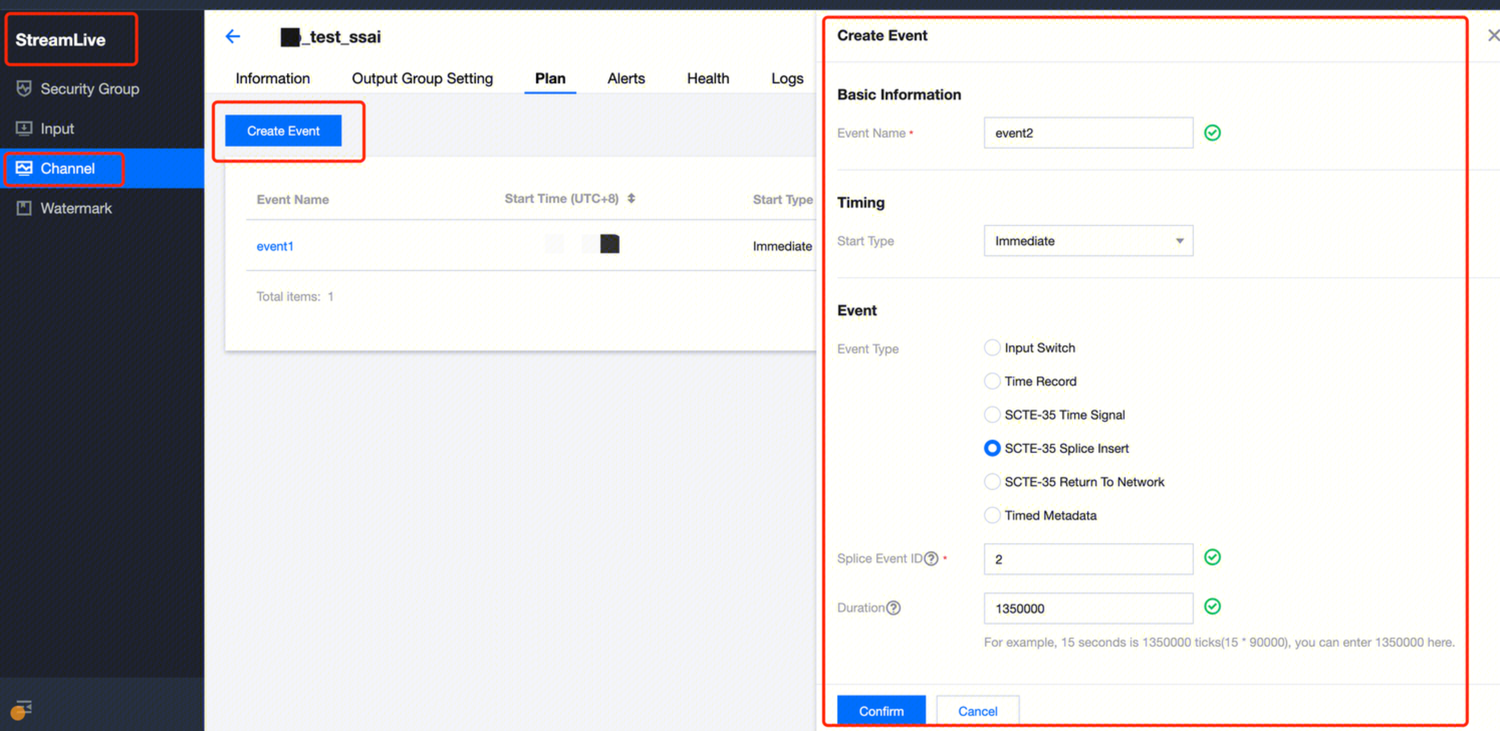
3. In the Plan of the StreamLive Channel, click Create Event, select the event type and time, and you can insert SCTE-35 events into the live stream.
image.png


Ad markers in VOD

1. The current StreamPackage is capable of processing ad markers within HLS on-demand files; moreover, on-demand files can also designate ad insertion points through the use of VMAP.
2. In future updates to StreamPackage, we will also support the functionality of inserting advertisement markers into on-demand files.
Help and Support

Was this page helpful?

Help us improve! Rate your documentation experience in 5 mins.

Feedback