Preparations
Download
Focus Mode
Font Size
With the advancement of streaming media technology and applications on internet, it is apparent that ad-supported streaming media delivery has become a major monetization strategy. By using Tencent Cloud's Stream Service, you can implement dynamic ad insertion based on SCTE-35 ad markers and SSAI. The complete general process of SSAI is as follows:
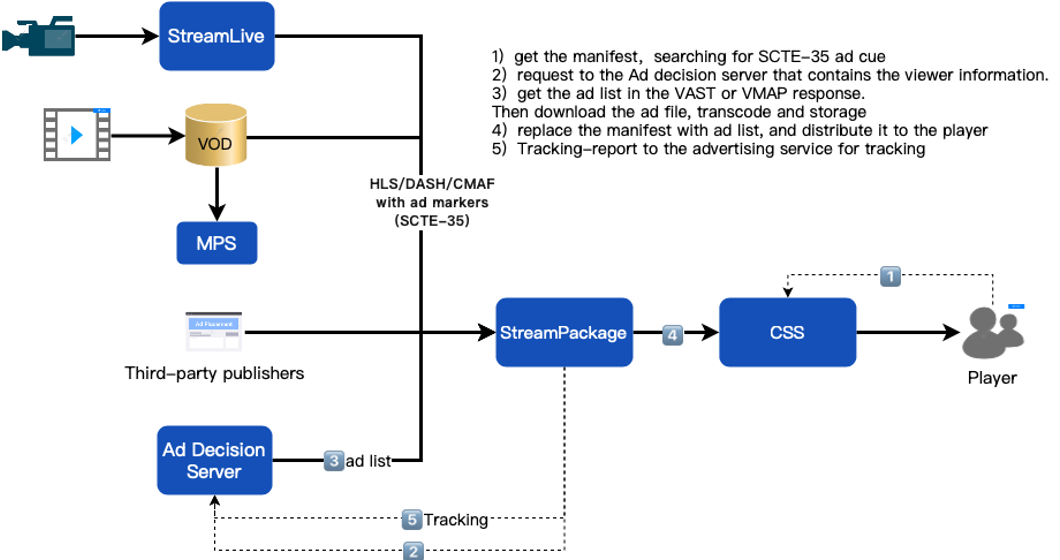
Transmit content sources with ad markers to StreamPackage. For example, in the case of a live content source, you can push the live stream to StreamLive for transcoding and insertion of ad SCTE-35 markers, and then transmit it to StreamPackage. If there are no subsequent processes, all server-side steps for CSAI have been completed. And subsequent process for SSAI is as follows:
1. The player requests the manifest (.m3u8), and StreamPackage fetches the origin manifest while parsing the manifest and checking the SCTE-35 ad markers.
2. StreamPackage send the request to the Ad Decision Server, parses the VAST/VMAP response, and obtains the ad video address.
3. StreamPackage downloads the ad video, transcodes and stores it.
4. StreamPackage updates the transcoded ad segment url in the manifest by inserting and replacing, and then distribute it.
5. After the ad is played on the client-side, StreamPackage reports to the ad tracking service for tracking the event.
Configuration process
Following the aforementioned process for ad insertion and replacement, users are required to make the following preparations in advance:
1. Prepare the content source.
2. Prepare the ad decision server.
3. Configure StreamPackage.
4. Configure the StreamPackage SSAI service domain name.
5. Insert ad markers.
Prepare the content source
Configure the source server to generate content manifests compatible with StreamPackage SSAI service.
HLS Content Source Requirements
The manifest must be accessible on the public network.
The manifest must be either live or video on demand (VOD).
The manifest must have EXT-X-VERSION 3 or higher.
For live content, the manifest must include ad markers. Video on demand (VOD) can use ad markers or specify advertising time information through VMAP.
Note:
If you want to use StreamLive as the content source, you can refer to 'Implementing Live Streaming' in StreamLive Feature Guide.
Prepare the ad decision server
StreamPackage SSAI service supports VAST and VMAP responses from the Ad Decision Server (ADS). The ADS should return an XML, and this XML should conform to the IAB specifications for the supported VAST and VMAP versions.
Currently, StreamPackage SSAI service supports the following versions of VAST and VMAP:
VMAP 1.0
Help and Support
Was this page helpful?
You can also Contact sales or Submit a Ticket for help.
Help us improve! Rate your documentation experience in 5 mins.
Feedback