tencent cloud

StreamLive

Introduction
Purchase Guide
Billing Overview
Overdue Payments and Service Suspension
Console Guide
Input Management
Channel Management
Asset Management
Plan Management
Feature Guide
Implementing Live Streaming
Stream Real-Time Monitoring
Digital Rights Management (DRM)
Forensic Watermark
Input Failover
Input Switch
Stream Pushing Callback Notification
Playlist
Scheduled Recording
Highlights
Time shifting
Delayed Playback
Adaptive Bitrate Streaming
Caption
Relay
Frame Capture
SCTE-35
PDT (HLS)
Archiving (Recording)
Dolby Audio
Output To YouTube
Ad Insertion
StreamLive Tag
API Documentation
History
Introduction
API Category
Making API Requests
Input Management APIs
Input Security Group Management APIs
Channel Management APIs
Plan APIs
Watermark Management APIs
Statistics APIs
Data Types
Error Codes
StreamLive Policy
Data Processing and Security Agreement
Privacy Policy
Related Agreement
Service Level Agreement

Archiving (Recording)

PDF
Focus Mode
Font Size
Last updated: 2024-07-22 10:52:24
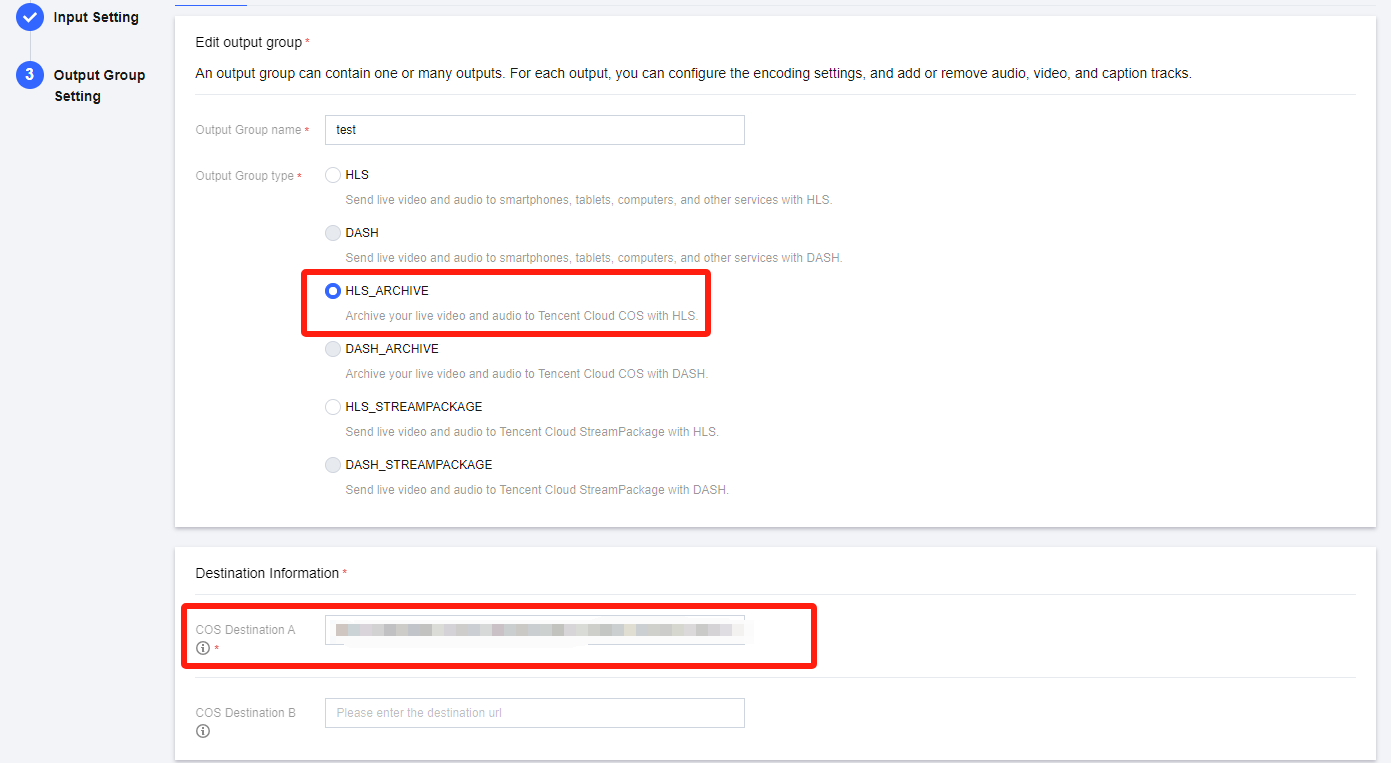
StreamLive allows you to save HLS/DASH streams to Tencent Cloud COS.
On the Output Group Setting page, select HLS_ARCHIVE or DASH_ARCHIVE as the Output Group Type and enter the COS address to save streams in COS Destination. After the channel is started, the live stream will be archived to COS in real time.


The difference between archiving and relay is that with archiving, the manifest file includes all audio/video files of the channel from the start to the end, but with relay, the manifest file is updated constantly and only includes the latest audio/video files.
The formats of the main manifest file for HLS and DASH streams are as follows:
HLS: ${COS Destination}/${region}/${ChannelId}-${p0 or p1}/${OutputGroupName}/${OutputGroupName}.m3u8
DASH: ${COS Destination}/${region}/${ChannelId}-${p0 or p1}/${OutputGroupName}/${OutputGroupName}.mpd
Help and Support

Was this page helpful?

Help us improve! Rate your documentation experience in 5 mins.

Feedback