tencent cloud

Chat

News and Announcements
Release Notes
Announcements
Product Introduction
Overview
Basic Concepts
Scenarios
Features
Account System
User Profile and Relationship Chain
Message Management
Group Related
Official Account
Audio/Video Call
Use Limits
Purchase Guide
Billing Overview
Pricing
Purchase Instructions
Renewal Guide
Service Suspension Explanation
Refund Policy
Development Guidelines
Demo Zone
Activate Service
Free Demos
Quick Run
Download
SDK and Demo Source Code
Update Log
Chat Interaction (UI Included)
TUIKit Introduction
Getting Started
Full-feature Integration
Single-function Integration
Build with AI
Build Basic Interfaces
More Features
Customizing Appearance
Internationalization
Push Service
Overview
Noun explanation
Activate the Service
Quick Start
Manufacturer Channel
Statistics
Troubleshooting Tool
Client APIs
REST API
Push Callback
Advanced Features
Release Notes
Error Codes
FAQS
Desk
Overview
Quick Start
Integration Guide
Admin Operation Manual
Agent Manual
More Practices
Live Streaming Setup Guide
AI Chatbot
Super Large Entertainment and Collaboration Community
Discord Implementation Guide
How to Integrate Chat into Games
WhatsApp Channel-style Official Account Integration Solution
Send Red Packet
Firewall Restrictions
No UI Integration
Quick Start
SDK Integration
Initialization
Login and Logout
Message
Conversation
Group
Community Topic
User Profile and Relationship Chain
Offline Push
Cloud Search
Local Search
Official Channel Management
Client APIs
JavaScript
Android
iOS & macOS
Swift
Flutter
Electron
Unity
React Native
C APIs
C++
Server APIs
Secure authentication with UserSig
RESTful APIs
Webhooks
Console Guide
New Console Introduction
Creating and Upgrading an Application
Basic Configuration
Feature Configuration
Account Management
Group Management
Official Channel Management
Webhook Configuration
Usage
Viewing Guide for Resource Packages
Real-Time Monitor
Auxiliary Development Tools
Access Management
Advanced Features
FAQs
uni-app FAQs
Purchase
SDK
Account Authentication
User Profile and Relationship Chain
Message
Group
Audio-Video Group
Nickname and Profile Photo
Security Compliance Certification
Service Level Agreement
Security Compliance Certification
Chat Policies
Privacy Policy
Data Privacy and Security Agreement
Migration
Migration Solutions
Migration Solutions Lite
Error Codes
Contact Us

One-to-One Message

PDF
Focus Mode
Font Size
Last updated: 2025-08-22 15:51:32

Use Cases

C2C chat on the app: C2C messages are applicable to C2C chats on the app.
App administrator sends messages: C2C messages can be sent by the app administrator from the backend, or by the app administrator simulating other users.
App administrator simulates system messages: The app administrator can simulate sending system messages from the backend. These simulated messages are notifications delivered to users, and custom messages from the app administrator received by the app will be specially handled.
Instant Messaging (Chat) provides comprehensive C2C messaging capabilities. At the same time, the permission control and extension capabilities of C2C messaging provide features such as getting message history, multi-device synchronization, offline message push, and carrying sender profiles in messages.

C2C Message Types

Message Type
Description
Text message
The message content is plain text.
Emoji message
Emoji messages are customized by developers.
Location message
The message content includes the caption, longitude, and latitude of the location.
Image message
The message content includes the URL, dimensions, and size of the image. The maximum supported image file size is 28 MB.
Voice message
The message content includes the URL, size, and duration of the voice. The maximum supported voice file size is 28 MB.
File message
The message content includes the URL, size, and format of the file. All file formats are allowed, and the maximum supported file size is 100 MB.
Short video message
The message content includes the URL, duration, size, and format of the short video. The maximum supported short-video file size is 100 MB.
Custom message
Message types that are customized by developers, such as red packet and rock-paper-scissor.
System notification message
This type of messages is divided into built-in system notification messages and system notification messages customized by developers.

C2C Messaging Capabilities

C2C Messaging Capability
Description
Use Cases
Send C2C messages
C2C messages can be sent through the SDK or RESTful API.
C2C chat on the app.
App administrator sends messages.
App administrator sends system messages.
Receive C2C messages
C2C messages can be received through the SDK.
Receive online messages.
Receive offline messages.
Query historical messages.

C2C Messaging Permission Control

C2C Messaging Permission Control
Description
Use Cases
Two app users can send C2C messages.
Any two strangers can send C2C messages to each other.
Strangers send C2C messages to each other.
App administrator sends C2C messages.
App administrator can send C2C messages to any user.
App administrator impersonates other users to send messages.
App administrator sends system messages.
Only friends are allowed to send C2C messages to each other.
Only friends can send C2C messages to each other.
Friends send C2C messages to each other.
Block messages from someone.
You can add a user to the blocklist to block their messages.
Unfriend someone.
Block messages from someone.

C2C Messaging Extension Capabilities

C2C Messaging Extension Capability
Description
Use Cases
Obtain history messages
Historical messages can be obtained through the SDK or RESTful API.
Obtain real-time chat history.
Download message history on a regular basis.
Multi-device synchronization
C2C messages can be synchronized across devices.
Users synchronize messages across clients.
Offline push of C2C messages
Support offline message push on Apple, Huawei, Xiaomi, OPPO, vivo, and Meizu mobile phones.
Push messages offline.
C2C messages carry sender profiles
Sender profiles can be carried by messages.
Display sender information such as the nickname and profile photo.

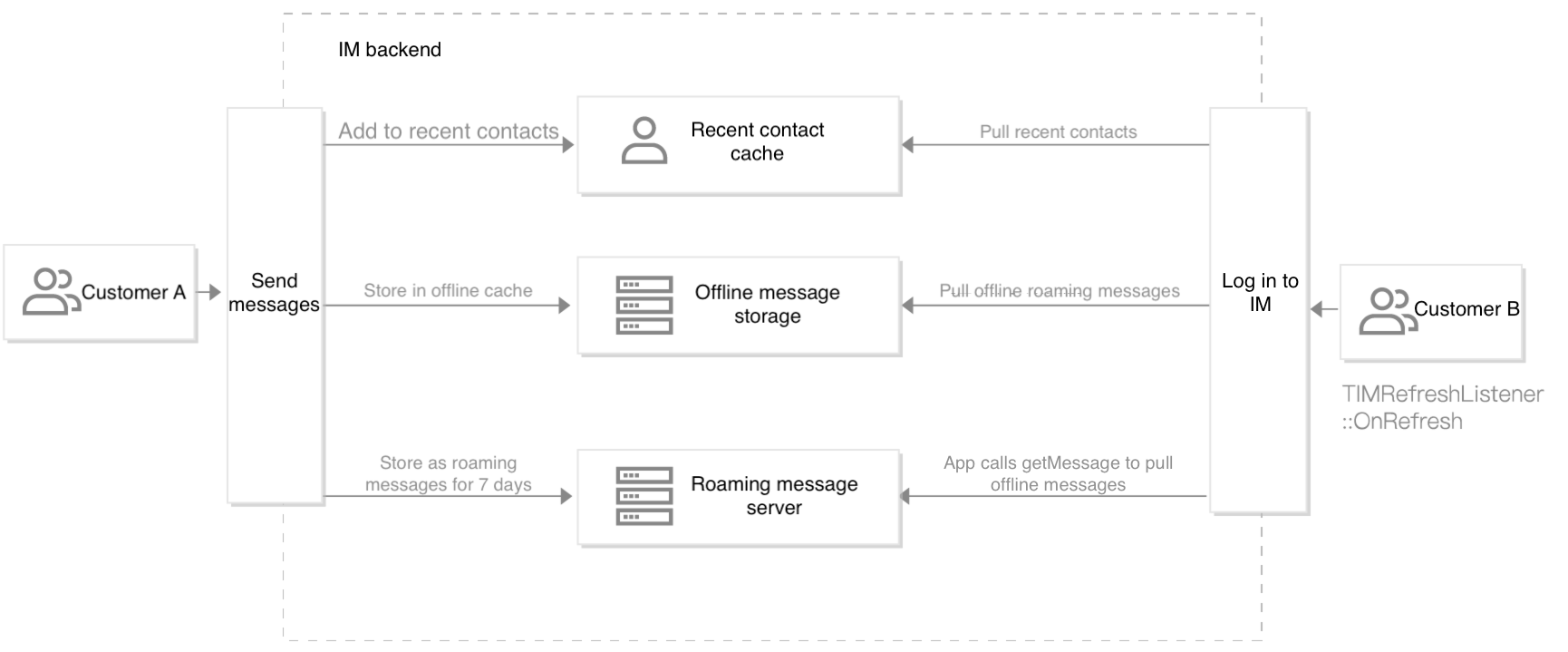
Processing of Offline C2C Messages


Offline cache and roaming of C2C messages:

1. User A calls sendMessage to send messages to user B who is offline.
User A is added to user B’s recent contacts, with up to 100 messages cached.
Messages are stored in the offline cache for 7 days.
Messages are stored on the roaming server for 7 days.
2. User B calls the login API to log in to Chat.
3. The SDK automatically pulls messages from the offline cache and delivers via the OnNewMessage callback.
4. The SDK automatically pulls recent contacts and delivers via the OnNewMessage callback.
5. The user is notified via the OnRefresh callback when message synchronization is completed.
6. The user calls getMessage. If local messages are incomplete, the SDK automatically pulls them from the roaming server.


Help and Support

Was this page helpful?

Help us improve! Rate your documentation experience in 5 mins.

Feedback