WebSocket 识别协议
下载
聚焦模式
字号
WebSocket URL 格式
URL 格式如下:
wss://mps.tencentcloud.com/wss/v1/<appid>?{请求参数}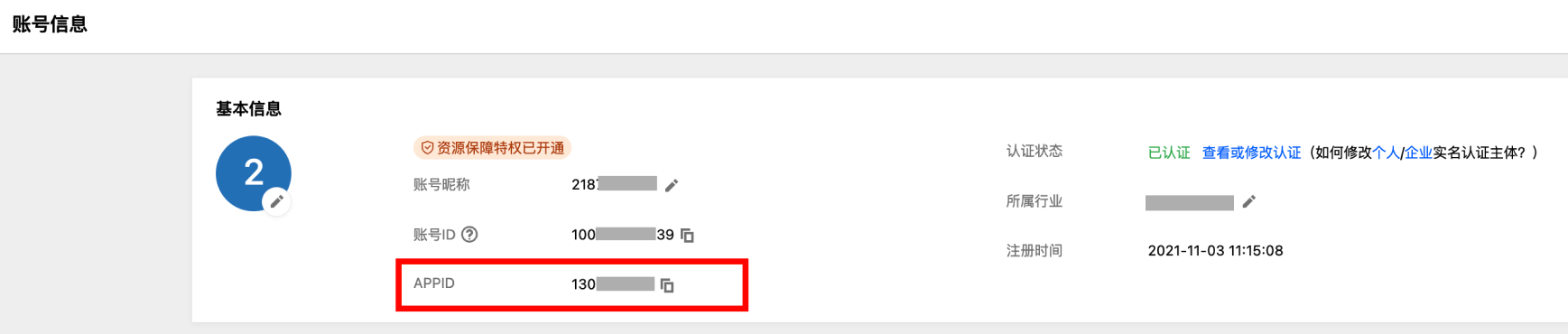
请求参数格式如下:
key1=value2&key2=value2...(key 和 value 都需要进行 urlencode)请求参数如下表:
名称 | 类型 | 必填 | 说明 | 示例 |
asrDst | string | 否 | ASR 的语言。 | zh |
transSrc | string | 否 | 翻译的源语言。 | zh |
transDst | string | 否 | 翻译的目标语言。 | en |
fragmentNotify | int | 否 | 0为稳态通知,1为非稳态结果也通知,默认为0。 | 0 |
resultType | int | 否 | 是否保留末尾的标点。 0:删除 1:保留 默认为1 | 1 |
timeStamp | uint | 是 | 当前 Unix 时间戳,单位秒。 | 1750217009 |
expired | uint | 是 | 过期 Unix 时间戳,单位秒。 | 1750220609 |
timeoutSec | uint | 否 | 超时时间,长时间未收到音频数据时结束,单位为秒,默认120。最长不能超过300。 | 120 |
secretId | string | 是 | 密钥 ID。 | - |
nonce | uint | 是 | 10位长度的随机整数。 | 7549145852 |
resId | string | 否 | 资源 ID,参考格式为 vts-{mps_appid}-{res_id}。用于支持分账。 | vts-2600007696-0 |
signature | string | 是 | 生成的签名。 | - |
说明:
asrDst 不为空时,transSrc 与 transDst 不生效,此时只进行 ASR 识别,生成源语言字幕。当
asrDst 为空时,transSrc 与 transDst 不能为空,此时除了进行 ASR 识别,还会进行字幕翻译。fragmentNotify,默认为0。签名生成
例如,对以下 URL 签名:
wss://mps.tencentcloud.com/wss/v1/1258344699?asrDst=zh&expired=1750220609&fragmentNotify=0&nonce=7549145852&secretId=<sid>&timeStamp=1750217009其中,
<sid> 是密钥 ID。第一步:拼接规范请求串
CanonicalRequest =HTTPRequestMethod + '\\n' +CanonicalURI + '\\n' +CanonicalQueryString + '\\n' +CanonicalHeaders + '\\n' +SignedHeaders + '\\n'
字段名称 | 解释 |
HTTPRequestMethod | 固定为 post。 |
CanonicalURI | URI 参数路径,/wss/v1/<appid>,<appid> 为用户的 appid。 如 /wss/v1/1258344699。 |
CanonicalQueryString | 发起 HTTP 请求 URL 中的查询字符串,如 asrDst=zh&expired=1750220609&fragmentNotify=0&nonce=7549145852&secretId=<sid>&timeStamp=1750217009参数需要按字典序进行排序。 |
CanonicalHeaders | 为 content-type:application/json; charset=utf-8\\nhost:<host>\\n其中<host>一般是域名,如 mps.tencentcloud.com |
SignedHeaders | 固定为 content-type;host |
第二步:拼接待签名字符串
StringToSign =Algorithm + "\\n" +RequestTimestamp + "\\n" +CredentialScope + "\\n" +HashedCanonicalRequest
字段名称 | 解释 |
Algorithm | 签名算法,目前固定为 TC3-HMAC-SHA256。 |
RequestTimestamp | 为 URL 中的 timeStamp,如1750217009。 |
CredentialScope | 凭证范围,格式为 <date>/mps/tc3_request。<date>为日期,必须是 UTC 时间,如2025-06-18。 如 2025-06-18/mps/tc3_request。 |
HashedCanonicalRequest | 前述步骤拼接所得规范请求串的哈希值,计算伪代码为:Lowercase(HexEncode(Hash.SHA256(CanonicalRequest))) |
第三步:计算签名
1、计算派生签名密钥
伪代码如下:
SecretKey = "********************************"SecretDate = HMAC_SHA256("TC3" + SecretKey, Date)SecretService = HMAC_SHA256(SecretDate, Service)SecretSigning = HMAC_SHA256(SecretService, "tc3_request")
字段名称 | 解释 |
SecretKey | 原始的 SecretKey。 |
Date | 即 CredentialScope 中的 <date> 字段信息。 |
Service | 固定为 mps。 |
2、计算签名
伪代码如下:
signature = HexEncode(HMAC_SHA256(SecretSigning, StringToSign))
最后生成的 URL 为:
wss://mps.tencentcloud.com/wss/v1/1258344699?asrDst=zh&expired=1750220609&fragmentNotify=0&nonce=7549145852&secretId=<sid>&timeStamp=1750217009&signature=<signature>以该 URL 去建立 WebSocket 长连接。
WebSocket 握手阶段
当 WebSocket 连接建立后,服务器会进行检查与鉴权,然后返回一个握手结果为 JSON 格式 Text Message,示例:
{"Code":0, //0 成功,非0失败"Message":"success", //错误说明"TaskId":"RnKu9FODFHK5FPpsrN" //会话ID,唯一标识}
名称 | 类型 | 必填 | 说明 |
Code | int | 是 | 0成功,非0失败。 |
Message | string | 是 | 错误说明。 |
TaskId | string | 是 | 任务 ID,唯一标识。 |
错误码
错误码 | 说明 |
0 | 成功 |
4001 | 非法参数。 |
4002 | 超时,一般是长时间没有成功接收到音频数据,默认超时时间为2分钟,可以通过参数指定。 |
4003 | 上传音频格式非法。 |
4004 | 长链接并发超过限制,默认为2。 |
4005 | 用户状态不合法,一般是用户欠费之类的。 |
4100 | 身份验证失败。 |
4101 | 未授权访问接口。 |
4102 | 未授权访问资源。 |
4104 | secretId 不存在。 |
4105 | 会话 ID 错误。 |
4106 | MFA 校验失败。 |
4110 | 鉴权失败。 |
4111 | appid 不合法。 |
4500 | 重放攻击,通常是 QPS 超限引起的。当同一个 appid 在短时间内有过多的 WebSocket 连接建立,就可能出现。 |
5000 | 内部错误。 |
音频上传
当鉴权成功后,服务器接收客户端推送的音频数据,是 binary message。消息定义如下表所示,字节序是网络字节序。
字段 | 类型 | 长度 | 说明 |
format | uint8 | 1字节 | 音频格式. |
IsEnd | uint8 | 1字节 | 1:表示随后一段时间,此用户没有音频数据,会强制刷新识别结果。 0:表示接下来此用户还有音频数据。 |
timeStamp | uint64 | 8字节 | 时间戳,单位 ms。 |
userIdLen | uint16 | 2字节 | 用户 ID 的长度。 |
userId | string | 参考 userIdLen | 用户 ID,同一个链接中标记一个音频源。 |
extLen | uint16 | 2字节 | 扩展长度,默认为0。 |
extData | char[] | 参考 extLen | 扩展数据,为以后扩展。 |
Audio | char[] | binary message 剩下数据 | 音频数据。 |
说明:
format 为1时,音频格式为 PCM 16kHz s16(16bit) 单通道。format 为2时,音频格式为 PCM 8kHz s16(16bit) 单通道。format 为3时,音频格式为 opus,一个二进制消息为一个 opus 包。 同一个 userId 的 format 不能改变,必须保持固定,否则会导致识别异常。
识别结果下发
当识别出结果后,服务器下发识别结果,是 JSON 格式 Text Message。
翻译结果通知
{"Response": {"NotificationType": "AiRecognitionResult","TaskId": "1258344699-wsssubtitle-d482fa50-5e1c-4c5c-b5b5-1083430e0d54","AiRecognitionResultInfo": {"ResultSet": [{"Type": "TransTextRecognition","TransTextRecognitionResultSet": [{"Text":"如何保障全球用户都能享受到高清流畅的视频内容。","Trans": "How to ensure that global users can enjoy high-definition and smooth video content.","StartPtsTime": 0.2,"EndPtsTime": 4.6,"Confidence": 100,"SteadyState": true,"StartTime": "2025-06-18T12:01:54Z","EndTime": "2025-06-18T12:01:58Z","UserId": "123456"}]}]}}}
单识别结果通知
如果只做 ASR 识别,不进行翻译,结果通知只包含
Text,没有 Trans 内容。{"Response": {"NotificationType": "AiRecognitionResult","TaskId": "1258344699-wsssubtitle-ce42ecfe-0f70-4244-91e0-07e6c20a5ab1","AiRecognitionResultInfo": {"ResultSet": [{"Type": "AsrFullTextRecognition","AsrFullTextRecognitionResultSet": [{"Text":"如何保障全球用户都能享受到高清流畅的视频内容。","StartPtsTime": 0.2,"EndPtsTime": 4.6,"Confidence": 100,"SteadyState": true,"StartTime": "2025-06-18T12:00:41Z","EndTime": "2025-06-18T12:00:45Z","UserId": "123456"}]}]}}}
结束通知
{"Response": {"NotificationType": "ProcessEof","TaskId":"1258344699-wsssubtitle-033a7ae4-50ef-4d1f-a73f-0e51a28d3a68","ProcessEofInfo": {"ErrCode": 4002,"Message": "data timeout"}}}
字段说明
名称 | 说明 |
NotificationType | 为 AiRecognitionResult 或者 ProcessEof。 |
TaskId | 任务 ID。 |
Type | 通知类型:AsrFullTextRecognition,TransTextRecognition,ProcessEof 等。 |
Text | 识别文字。 |
StartPtsTime | 开始时间戳,单位秒,对照音频上传的 timeStamp 字段。 |
EndPtsTime | 结束时间戳,单位秒,对照音频上传的 timeStamp 字段。 |
StartTime | UTC 时间,服务器接收到音频包的时间。 |
EndTime | UTC 时间,结束时间。 |
Confidence | 可信度0-100。 |
SteadyState | 稳态标记表明这个结果不会变化了。 |
UserId | 用户 ID 与音频上传的 UserId 相对应。 |
ErrCode | 参考握手阶段的错误码,一般只有4002与4003。 |
Message | 错误消息。 |
文档反馈