tencent cloud

Media Processing Service

Release Notes and Announcements
Release Notes
Announcements
Product Introduction
Overview
Features
Strengths
Use Cases
Purchase Guide
Billing Overview
Purchase Instructions
Top Up and Purchase
Overdue Payments
Refund
Getting Started
Console Guide
Overview
Creating Tasks
Tasks
Orchestrations
Templates
Resource Packs
Video Evaluation
AIGC Content Generation
Terminal SDK
Subtitle Editing Tool
Usage Statistics
Cloud Access Management Sample
Integration Tutorials
Audio/Video Transcoding Integration
Audio/Video Enhancement Integration
Audio Separation Integration
Integration of Digital and Visible Watermarks
Media AI Integration Tutorial
Media Quality Inspection Integration
Terminal SDK integration
MPS Live Stream Recording integration
DRM integration
Other tutorials
Application Scenario and Practical Tutorial
Image Quality Improvement Scenario
Audio/Video Cost Optimization Scenario
Short Drama Translation Scenario
AI-Generated Content Scenario
Online Education Scenarios
API Documentation
History
Introduction
API Category
Making API Requests
Processing Task Initiation APIs
Task Management APIs
Transcoding and Enhancement Template APIs
Watermark Template APIs
Screenshot Template APIs
Media AI Template APIs
Media AI—Hotword Lexicon APIs
Media AI—Sample Management APIs
Media Quality Inspection Template APIs
Live Streaming Recording Template APIs
Orchestration Management APIs
Data Statistics APIs
StreamLink—Security Group Management APIs
Other APIs
Image Processing Template APIs
AI Generation APIs
Other APIs
Data Types
Error Codes
Other Documents
WebSocket Protocol for Recognition
FAQs
Basics
Account Authorization
Task Configuration
Task Initiation
Task Result Viewing
Related Agreement
Service Level Agreement
Privacy Policy
Data Processing And Security Agreement
Contact Us
Glossary

Audio/Video Cost Optimization Scenario

PDF
Focus Mode
Font Size
Last updated: 2025-03-21 15:24:03

Overview

Live commerce, online education, remote conferencing, short videos, short dramas, and AI creation trends lead to more video content. Providers must balance efficiency and cost. Cost optimization is key for sustainability and competitiveness. Tencent Cloud Media Processing helps reduce processing and storage costs.

Requirements

The surge in video content has raised storage and data transmission costs, requiring tech solutions to reduce expenses.
Balancing the number of activated features is crucial in audio and video processing to avoid minimal optimization or high costs.
Differentiating video processing based on specific issues could maximize cost benefits.

Our Solutions

Leading Encoding Compression Capabilities

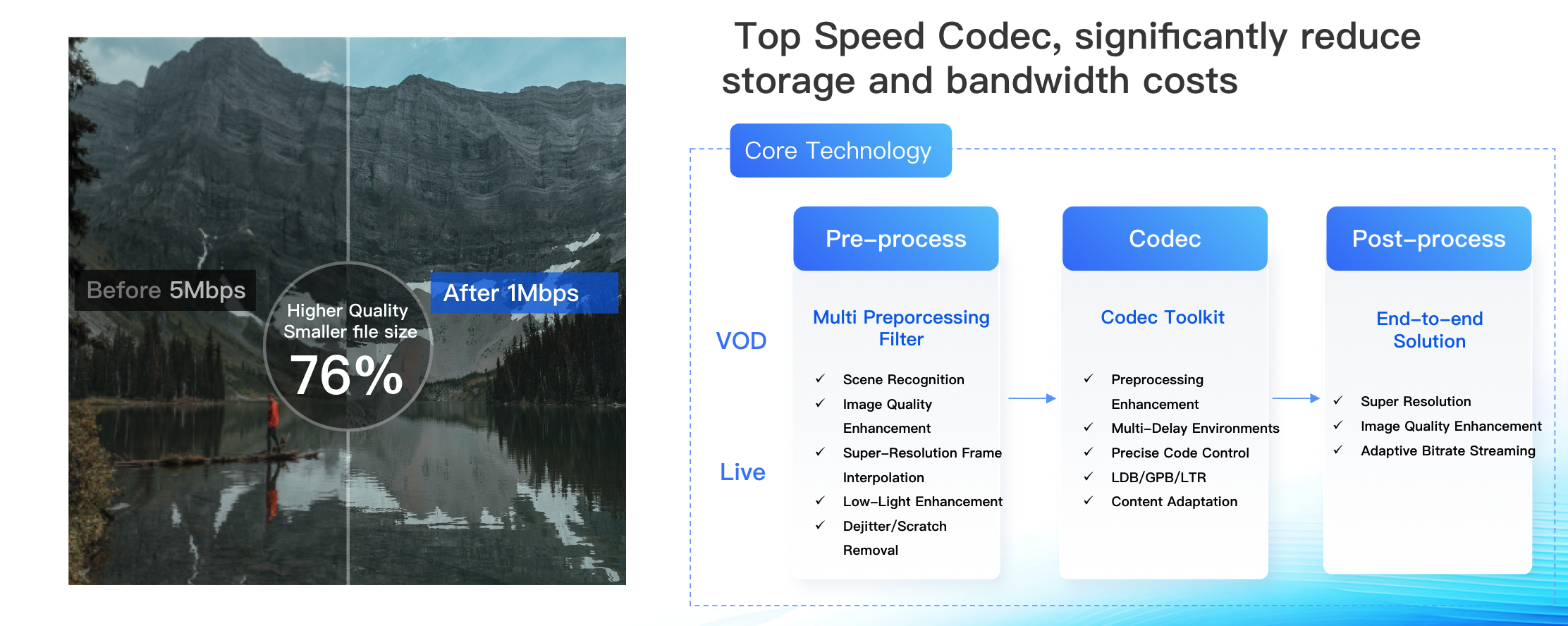
Supports encoding standards such as VP8, VP9, H.264, H.265, AV1, AVS3, H.266, etc., and supports real-time encoding for 4K and 8K, providing an ultra-high-definition and smooth video experience. While ensuring the subjective quality of the video, it saves 50% of bandwidth costs. For the past three years, it has consistently won first place in the MSU Video Coding Competition; it has also achieved the best overall performance in the Streaming Learning Center's encoding evaluation. You can experience the transcoding effects on our online demo page.


Within the Media Processing Console, a variety of audio and video transcoding templates have been made available for your convenience. Each template comes pre-configured with a set of transcoding parameters, allowing you to swiftly select the appropriate transcoding template tailored to your specific business scenario.

You may also create new templates to customize various parameters. For details on creating templates and configuring parameters, please refer to Audio and Video Transcoding Templates. For information on the costs associated with audio and video transcoding, please visit Billing Instructions.

On-Demand Processing Solution

Tencent Cloud's audio and video services provide high-quality transcoding and an on-demand "Quality Inspection + Transcoding & Enhancement" solution. To optimize costs, videos can be inspected before transcoding, allowing for a suitable template selection based on the inspection results.
Feature
Description
How to use
Quality Inspection
Media Quality Inspection Supports:
Format quality inspection: Detects format issues such as DTS, PTS problems, resolution changes, sampling rate changes, frame loss, and duplicate frames.
Video & Audio Content Quality Inspection: JitterResults, BlurResults, AbnormalLightingResults, CrashScreenResults, BlackWhiteEdgeResults, NoiseResults, MosaicResults etc.
No-Reference quality assessment
Refer to the Media Quality Inspection Integration documentation.
General transcoding/TSC transcoding/Adaptive bitrate streaming
1In on-demand processing scenarios, media assets are first inspected for quality. Based on this inspection, videos with format problems or high bitrates are transcoded, while those without issues skip this step, reducing transcoding costs.
Refer to the ProcessMedia documentation.

Evaluating after Transcode

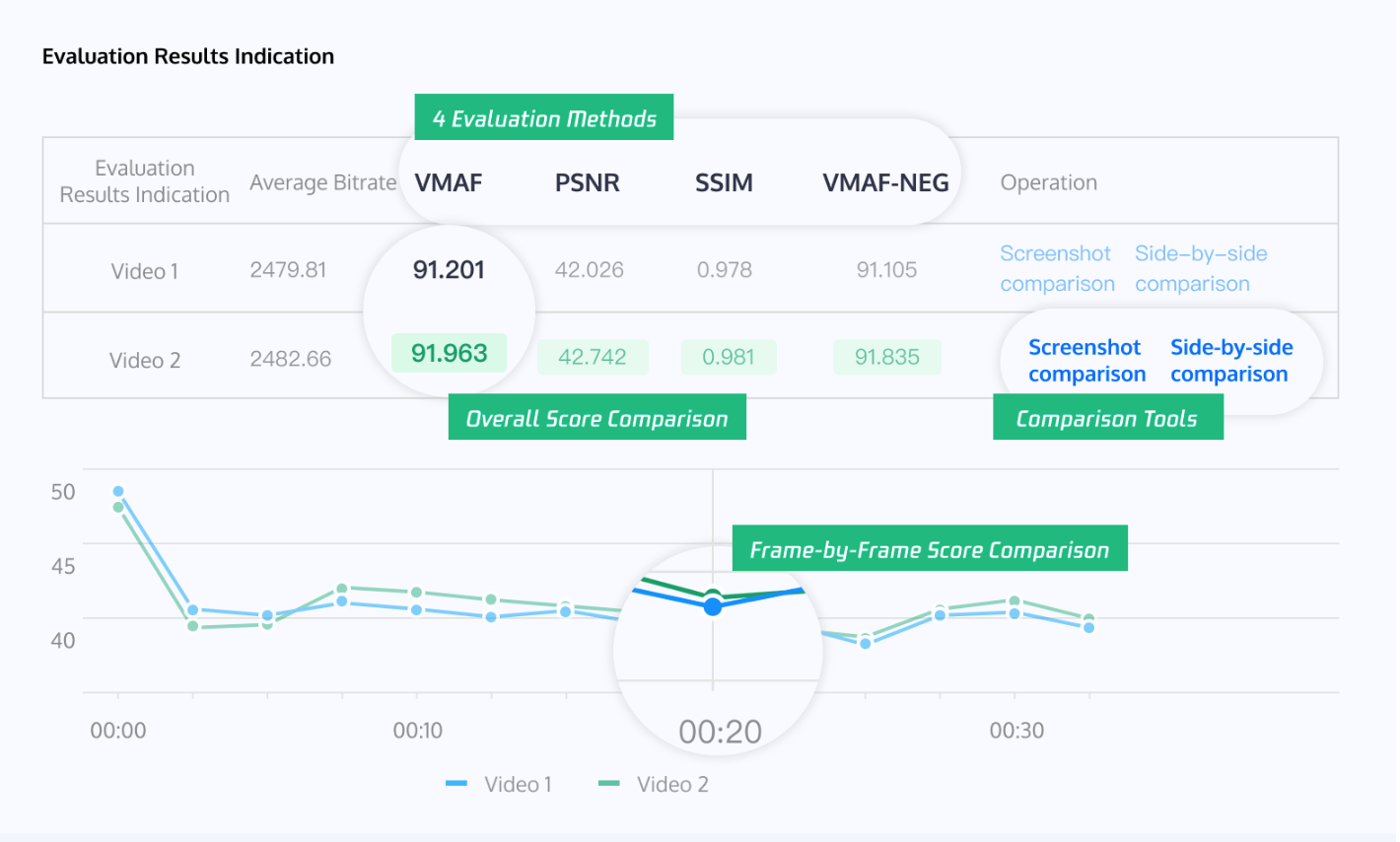
Upon completion of the transcoding process, users can also quantitatively assess the transcoding results through the transcoding evaluation feature. Tencent Cloud Media Processing offers comprehensive transcoding evaluation capabilities, supporting VMAF, PSNR, SSIM, and VMAF-NEG scoring for videos from various sources and in multiple formats.

Classification
Feature
Description
How to use
On-demand video
Video quality evaluation
Adds the original video and the comparison video to perform video quality evaluation.
Supports evaluation methods including VMAF, PSNR, SSIM and VMAF-NEG.
Supports customizing the selection of a time period or range of frames for evaluation.
Refer to the User Guide documentation.
BD-Rate comparison evaluation
Selects a Media Processing Service template and evaluates the differences in video transcoding quality of different templates at various bitrates.
Supports evaluation methods including VMAF, PSNR, SSIM, and VMAF-NEG.
Supports customizing the selection of a time period or range of frames for evaluation.
Supports comparing evaluation scores at specified bitrates or comparing bitrates at a specified CRF (video quality score).
Refer to the User Guide documentation.
Live stream
Image quality
Supports real-time comparison and monitoring of image quality and bitrate changes before and after live stream transcoding.
Coming soon.


Help and Support

Was this page helpful?

Help us improve! Rate your documentation experience in 5 mins.

Feedback