tencent cloud

Media Processing Service

Release Notes and Announcements
Release Notes
Announcements
Product Introduction
Overview
Features
Strengths
Use Cases
Purchase Guide
Billing Overview
Purchase Instructions
Top Up and Purchase
Overdue Payments
Refund
Getting Started
Console Guide
Overview
Creating Tasks
Tasks
Orchestrations
Templates
Resource Packs
Video Evaluation
AIGC Content Generation
Terminal SDK
Subtitle Editing Tool
Usage Statistics
Cloud Access Management Sample
Integration Tutorials
Audio/Video Transcoding Integration
Audio/Video Enhancement Integration
Audio Separation Integration
Integration of Digital and Visible Watermarks
Media AI Integration Tutorial
Media Quality Inspection Integration
Terminal SDK integration
MPS Live Stream Recording integration
DRM integration
Other tutorials
Application Scenario and Practical Tutorial
Image Quality Improvement Scenario
Audio/Video Cost Optimization Scenario
Short Drama Translation Scenario
AI-Generated Content Scenario
Online Education Scenarios
API Documentation
History
Introduction
API Category
Making API Requests
Processing Task Initiation APIs
Task Management APIs
Transcoding and Enhancement Template APIs
Watermark Template APIs
Screenshot Template APIs
Media AI Template APIs
Media AI—Hotword Lexicon APIs
Media AI—Sample Management APIs
Media Quality Inspection Template APIs
Live Streaming Recording Template APIs
Orchestration Management APIs
Data Statistics APIs
StreamLink—Security Group Management APIs
Other APIs
Image Processing Template APIs
AI Generation APIs
Other APIs
Data Types
Error Codes
Other Documents
WebSocket Protocol for Recognition
FAQs
Basics
Account Authorization
Task Configuration
Task Initiation
Task Result Viewing
Related Agreement
Service Level Agreement
Privacy Policy
Data Processing And Security Agreement
Contact Us
Glossary

Basics

PDF
Focus Mode
Font Size
Last updated: 2025-08-19 15:46:40

Concepts

What Is MPS?

Media Processing Service (MPS) is a cloud-based transcoding and audio-video processing service capable of handling vast amounts of data. You can use it to transcode your videos stored in Tencent Cloud COS or AWS S3 to make them suitable for OTT services or playback on PC and mobile devices. You can also transcode videos to different bitrates and resolutions for different platforms. Other services MPS offers include watermarking, video screenshot, audio and video enhancement, intelligent analysis, intelligent recognition, live broadcasting recording, etc.

What Is Video Bitrate?

Video bitrate is the number of data bits transferred per unit time. It is often measured in Kbps, or kilobits per second. Bitrate (Kbps) = File size (KB) × 8 ÷ Transfer time (s)

What Is TESHD in MPS?

TESHD is a process where videos are processed to reduce bandwidth usage while retaining or improving video quality. It allows you to deliver higher-definition videos to your users with less bandwidth usage.

Does MPS Use Hardware or Software for Decoding?

MPS offers video processing services such as on-cloud transcoding, watermarking, thumbnail generation, and audio and video enhancement. It does not offer decoding services.

Features

Does MPS Provide Test Accounts?

No, it does not. If you have test requirements, you can contact Tencent Cloud's business team to apply for testing vouchers.

What Screenshot Taking Modes Does MPS Support?

MPS supports time point screenshot (single screenshots), sampled screenshot (multiple screenshots), image sprite screenshot, and animated screenshot. For details, see Screenshot Template in Template Settings.

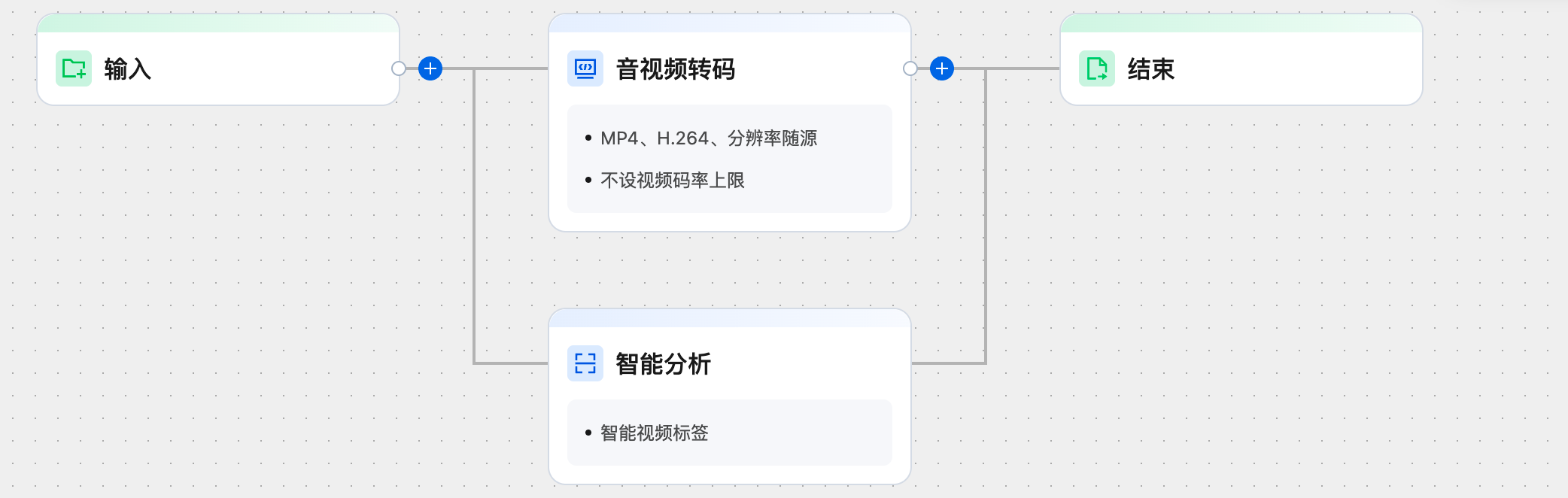
Does It Support Conducting Multiple Processing Tasks on a Single Input Source Simultaneously?

Yes, as illustrated below, you can add multiple processing nodes within the orchestration.


Does MPS Support Video Splicing?

Yes, it does. You cannot splice videos via the console but can call an API to splice videos. For detailed directions, see Edit Media.

Is it Possible to Convert the Audio in a Video into Text?

After performing content recognition on a video through the MPS Video Content Recognition, the outcome will provide the text recognized within the video's audio. For instructions on how to use this feature, please refer to Intelligent Video Recognition.

Can the Intelligent Cover Be Set as an Animated Image?

The extraction of an intelligent cover involves selecting one or several screenshots from the video to serve as the recommended cover, and it does not support the automatic generation of animated images through this feature.
If you require an animated cover, you may first create a highlight video clip intelligently through the Intelligent Analysis - Highlight Clipping feature. After selecting an appropriate segment, you can then use the Animated Screenshot feature to obtain an animated image.

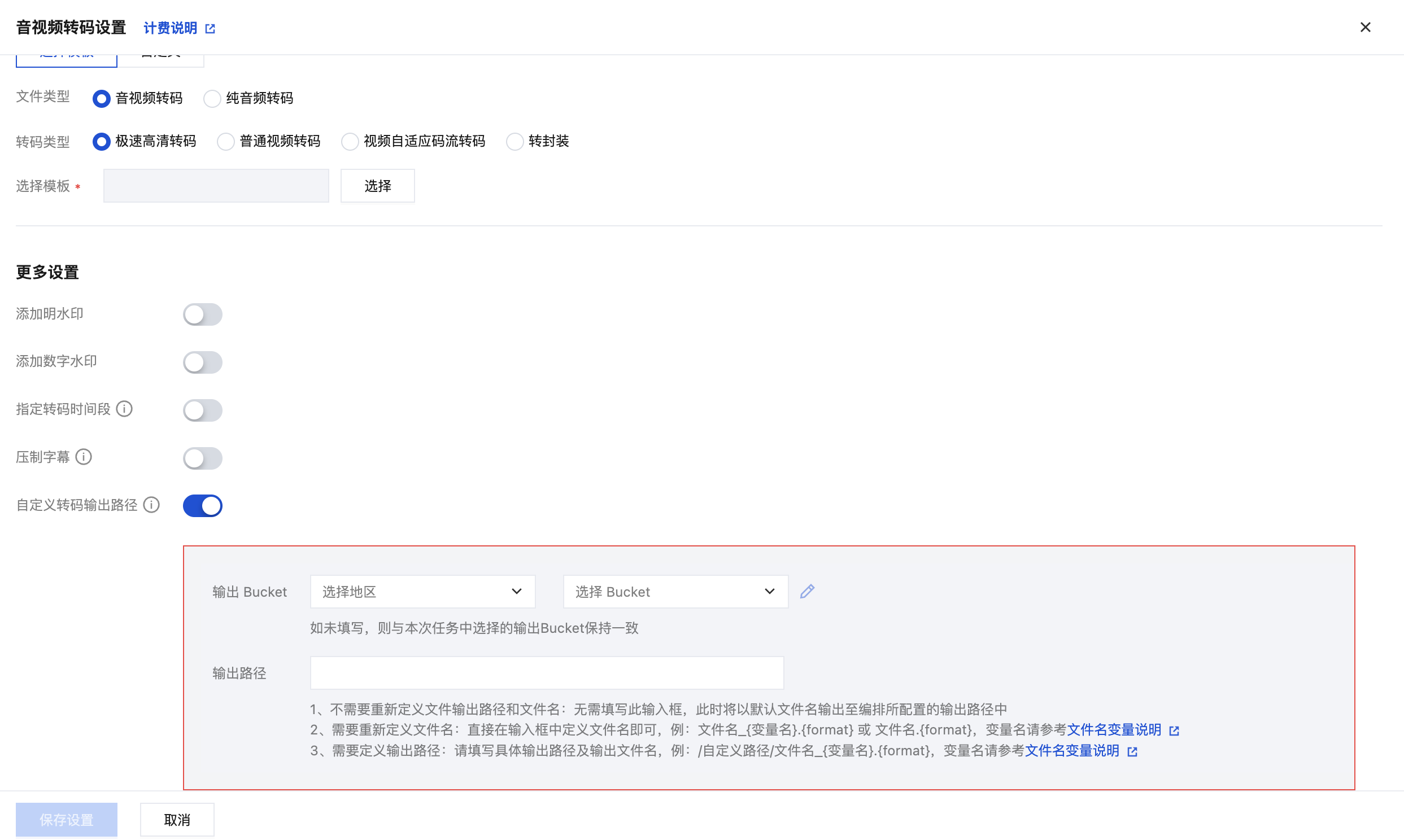
Can Multiple Output Directories Be Configured in the Orchestration Simultaneously?

Yes.
Taking the audio/video transcoding node as an example, you may configure it under More Settings > Customize Transcoding Output Path . Additionally, this feature allows you to modify the naming convention of the output files. For more details, please refer to the description on Filename Variables.


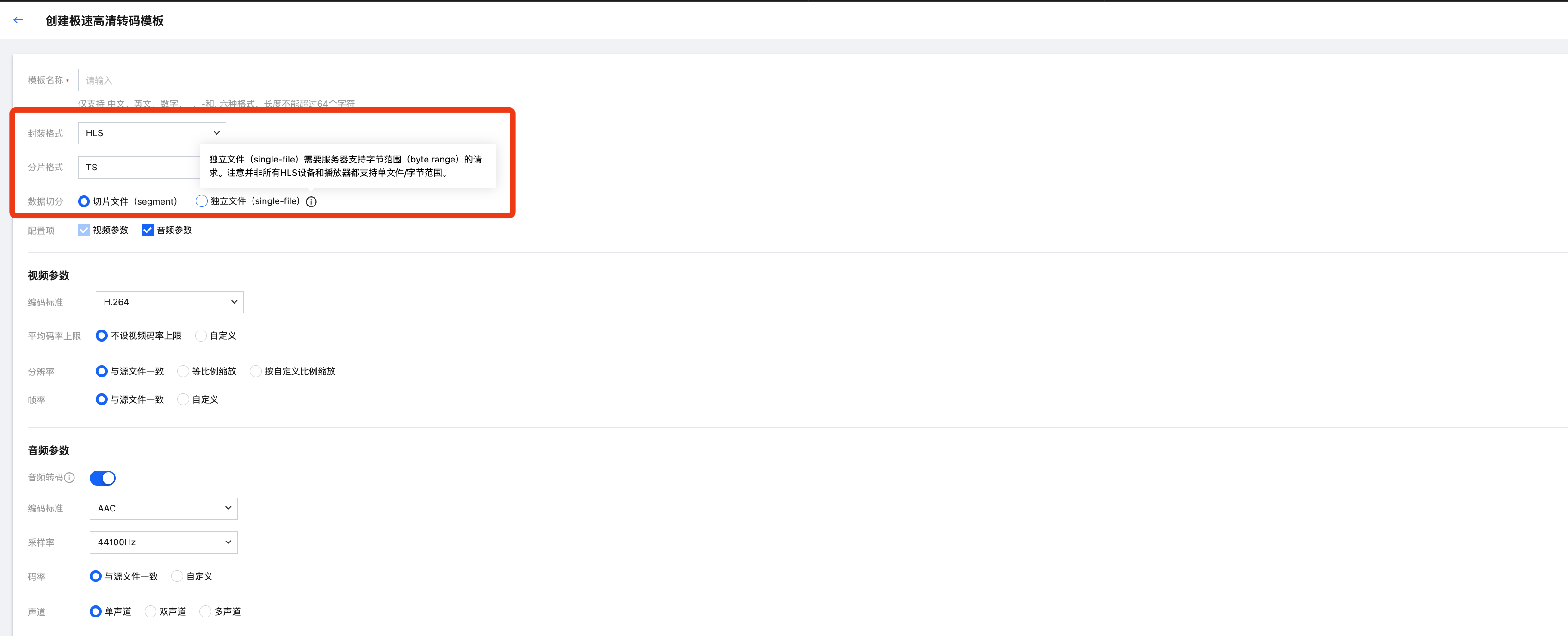
Does MPS Support Video Segmentation?

When the packaging format is set to HLS, it supports the configuration of segmentation format, data splitting format, etc.


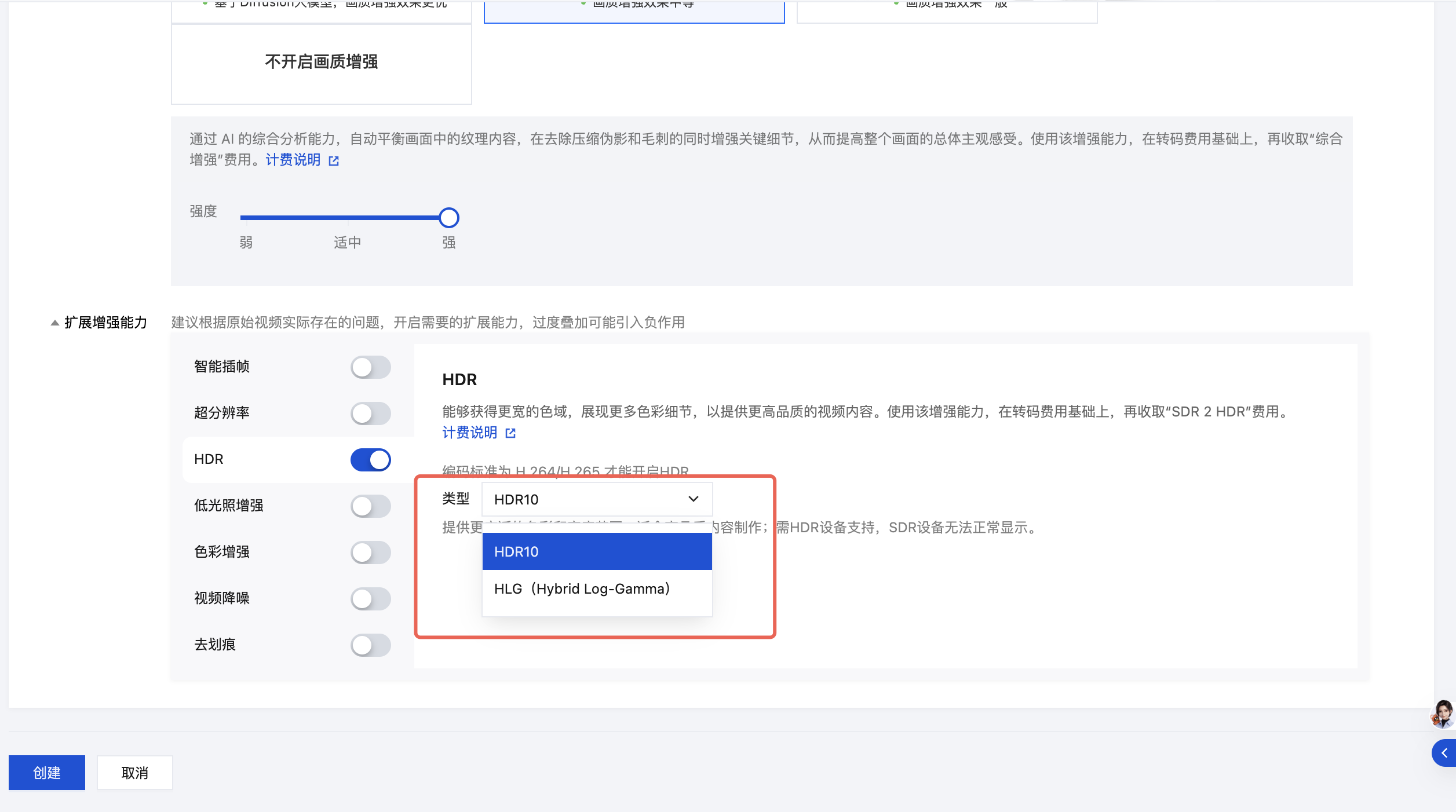
Does MPS Support HDR?

The audio/video enhancement feature supports the activation of HDR and allows for the switchover between two modes: HDR10 and HLG. Note that utilizing HDR requires the encoding standard to be set to H.265; failure to do so will result in the processing task failure.


Help and Support

Was this page helpful?

Help us improve! Rate your documentation experience in 5 mins.

Feedback