tencent cloud

Key Management Service

Product Introduction
Product Overview
Product Strengths
Use Cases
Concepts
Purchase Guide
Billing Overview
Purchase Method
Renewal Instructions
Payment Overdue
Console Guide
Getting Started
Key Management
Access Control
Audit
TCCLI Management Guide
Operation Overview
Creating Key
Viewing Key
Editing Key
Enabling/Disabling Key
Key Rotation
Encryption and Decryption
Asymmetric key decryption
Deleting Key
Practical Tutorial
Symmetrical Encryption and Decryption
Asymmetric Encryption and Decryption
Post-Quantum Cryptography Practice In KMS
Importing External Key
Implementing Exponential Backoff to Deal with Service Frequency
Cloud Product Integration with KMS for Transparent Encryption
API documentation
History
Introduction
API Category
Key APIs
Making API Requests
Asymmetric Key APIs
Data Types
Error Codes
Service Level Agreement
FAQS
FAQs
General
KMS Policy
Privacy Policy
Data Processing And Security Agreement
Contact Us
Glossary
DocumentationKey Management ServicePractical Tutorial Cloud Product Integration with KMS for Transparent Encryption

Cloud Product Integration with KMS for Transparent Encryption

PDF
Focus Mode
Font Size
Last updated: 2025-08-27 15:35:40

Overview

Tencent Cloud Key Management Service (KMS) is a secure, reliable, and simple and easy-to-use managed service that helps you easily create and manage keys to protect the security of the key. Tencent Cloud KMS seamlessly integrates with most Cloud services on Tencent Cloud. For Cloud products integrated with KMS, you only need to select a key managed by KMS to encrypt/decrypt data within the Cloud Product.
Cloud Product Integration with KMS encryption brings the following benefits:
Cloud services encrypt user data through integration with KMS, with encryption keys controlled by users. KMS uses FIPS-140-2 certified Hardware Security Modules (HSM) to generate and protect keys.
Provide users with a transparent encryption solution. Users only need to enable the encryption service for Cloud products integrated with KMS, with no need to worry about encryption details, to achieve transparent data encryption/decryption in the cloud.
No need to manually build and maintain a Key Management Infrastructure, reducing development costs while ensuring secure and convenient user use.
Note:
Since other cloud products are not key managers, before using Cloud products integrated with KMS to encrypt data, you need to pass through Tencent Cloud CAM to complete the role-based authorization operation of KMS for Cloud services.

Supported Key Types

Root Key (Customer Master Key, CMK) is a key created by users or Cloud services through the Key Management System, primarily used to encrypt and protect data keys. A root key can encrypt multiple data keys (DEKs).
KMS provides the following two root keys:
Custom key
Users can autonomously create keys through the Key Management System. There are two key source methods: KMS creation or manual import (BYOK). For more information, see key creation and external key import in the key management system.
Cloud service key by default
When a user first uses KMS encryption through corresponding cloud services, the cloud platform automatically creates a key for the user via the Key Management System. Cloud service keys can be queried in the KMS console but do not support disable or scheduled deletion operations.

Encryption Principles

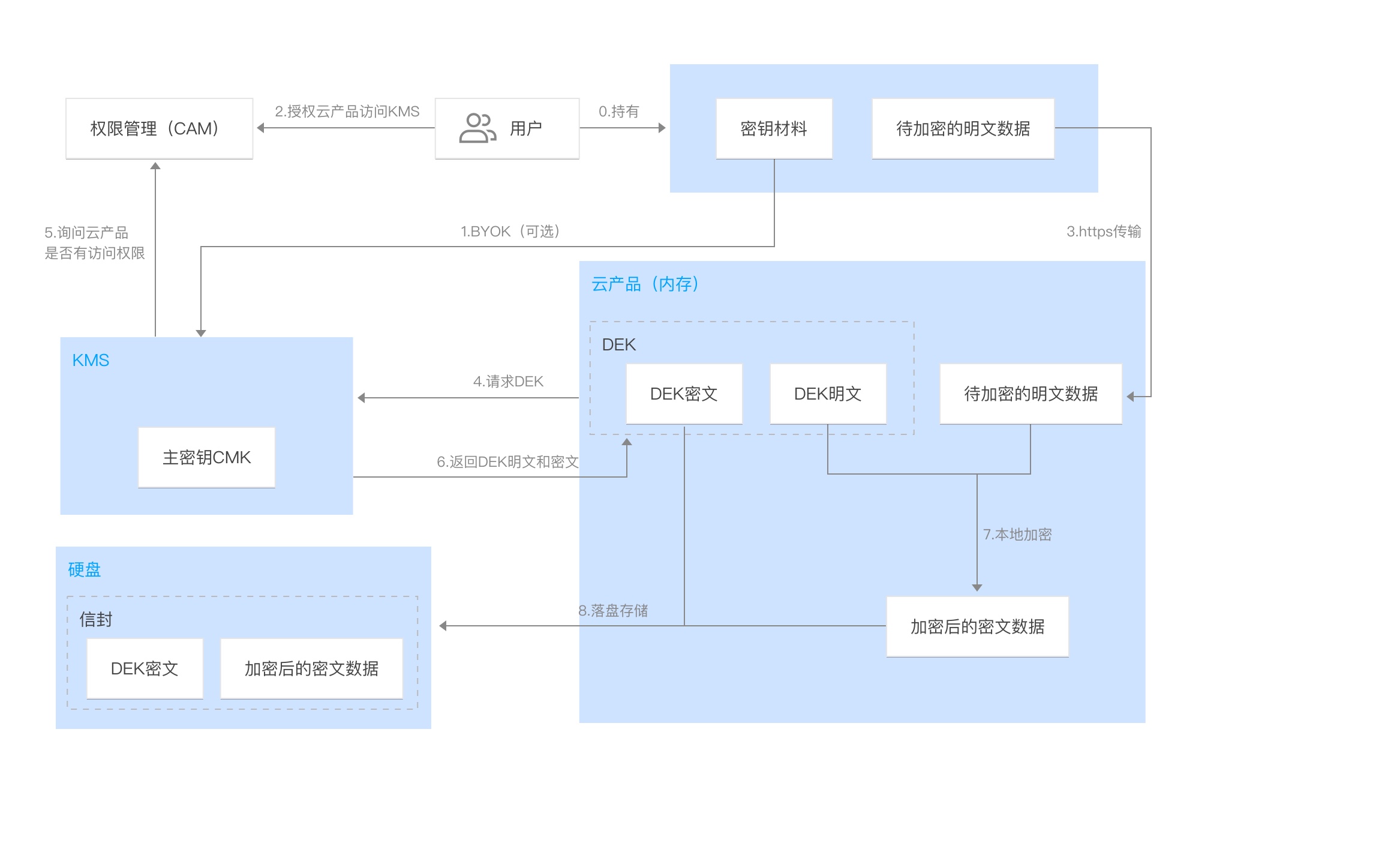
The business forms and customer requirements of different cloud products vary slightly in their specific encryption designs. Typically, cloud products use the Envelope encryption way to achieve data encryption and decryption by calling the KMS API.
The encryption principle for cloud products using KMS is illustrated in the figure below:

The encryption process is as follows:
1. Enable KMS service and complete role authorization for cloud products.
2. Create a root CMK in KMS. Users can use the default cloud service key or customize one.
3. Generate a data key DEK ciphertext and DEK plaintext by calling the GenerateDataKey API with CMK. The DEK is encrypted for protection by CMK.
4. The DEK plaintext is cached in the product backend memory. Encrypt user data locally to get ciphertext data.
5. Cloud services store the DEK ciphertext and encrypted ciphertext data on disk.

Currently Supported Cloud Products

Cloud File Storage (CFS) (allowlist for usage)


Help and Support

Was this page helpful?

Help us improve! Rate your documentation experience in 5 mins.

Feedback