tencent cloud

Key Management Service

Product Introduction
Product Overview
Product Strengths
Use Cases
Concepts
Purchase Guide
Billing Overview
Purchase Method
Renewal Instructions
Payment Overdue
Console Guide
Getting Started
Key Management
Access Control
Audit
TCCLI Management Guide
Operation Overview
Creating Key
Viewing Key
Editing Key
Enabling/Disabling Key
Key Rotation
Encryption and Decryption
Asymmetric key decryption
Deleting Key
Practical Tutorial
Symmetrical Encryption and Decryption
Asymmetric Encryption and Decryption
Post-Quantum Cryptography Practice In KMS
Importing External Key
Implementing Exponential Backoff to Deal with Service Frequency
Cloud Product Integration with KMS for Transparent Encryption
API documentation
History
Introduction
API Category
Key APIs
Making API Requests
Asymmetric Key APIs
Data Types
Error Codes
Service Level Agreement
FAQS
FAQs
General
KMS Policy
Privacy Policy
Data Processing And Security Agreement
Contact Us
Glossary

Creating a Key

PDF
Focus Mode
Font Size
Last updated: 2024-01-11 16:28:54

Scenarios

A CMK can be created in the KMS console or by calling the CreateKey API. After creation, you can manage the CMK by enabling, disabling, rotation and granting permission. This document describes how to create a CMK in the console.

Directions

1. Log in to the KMS Console.
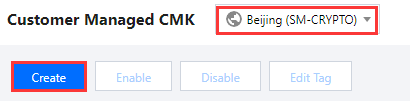
2. Select the region for which you want to create a key and click Create.


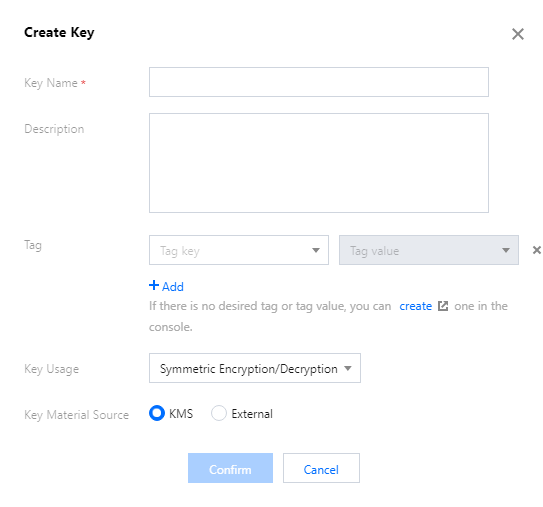
3. Enter the following information in the pop-up box:
Key Name: This is required and must be unique within the region. It can contain letters, numbers, _, -, and cannot begin with "KMS-".
Description: This is optional and used to specify the type of data to be protected, or the application to be used in conjunction with the CMK.
Tag: This is optional. Tag is a Tencent Cloud resource management tool that allows you to categorize, search and aggregate keys.
Key Usage: This is required and supports symmetric encryption and decryption, asymmetric encryption and decryption, or asymmetric signature verification.
Key Material Source: This is required. You can choose to generate the key in KMS or import your own key.
Note:
External key material is supported only for symmetric encryption and decryption.

Click OK to go back to the key list, and then you can see the new key at the top of the list.

Help and Support

Was this page helpful?

Help us improve! Rate your documentation experience in 5 mins.

Feedback